I got it wrong and am actually using a Pixel 5a (barbet) with android 15 / Lineage 22.1-20250321-NIGHTLY-barbet.
I will most likely try to migrate at some point soon and will report here. Wish me luck 
I got it wrong and am actually using a Pixel 5a (barbet) with android 15 / Lineage 22.1-20250321-NIGHTLY-barbet.
I will most likely try to migrate at some point soon and will report here. Wish me luck
I made the P5a barbet unofficial builds, and hope to hook up OTA updates on them in the somewhat near future. Until then, updated builds (which I will make after iodé releases new versions) will have to be applied by adb sideload in recovery.
I’m moving this thread to the GSI & Community Builds category.
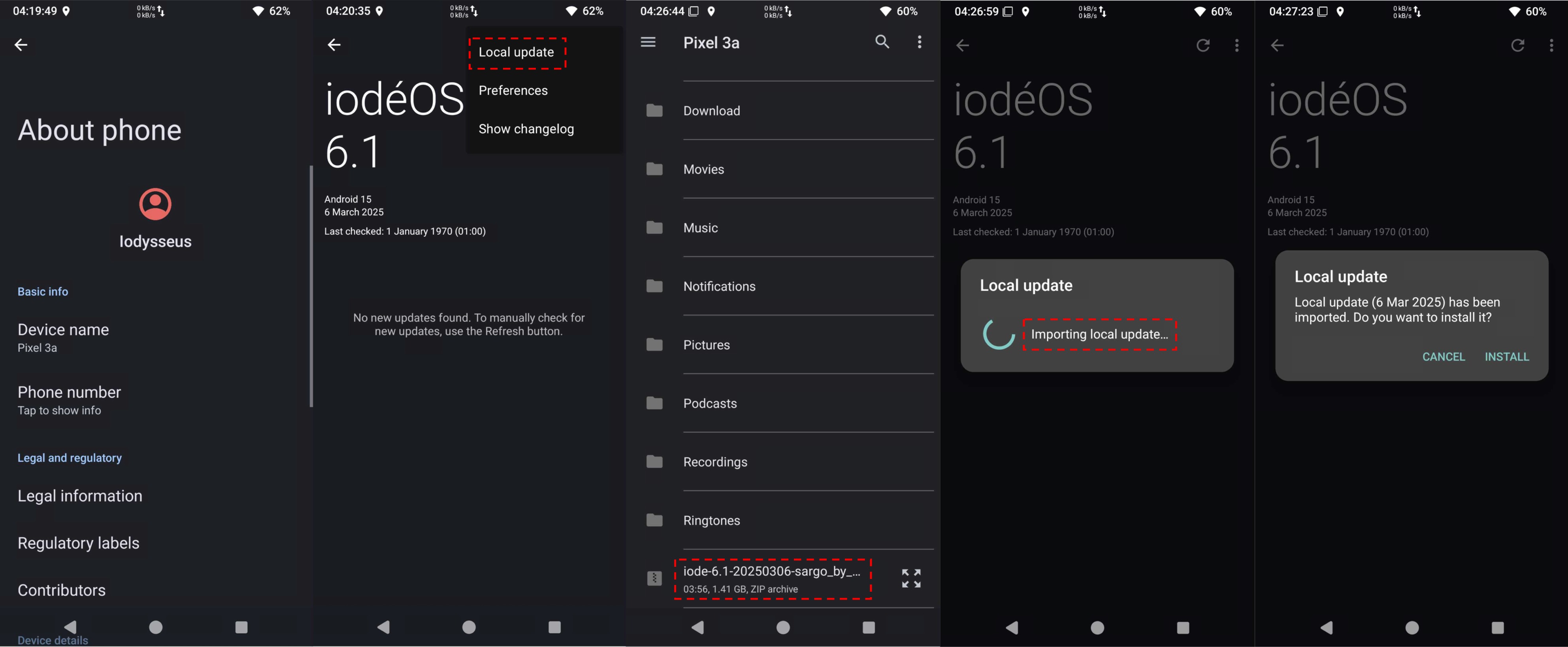
Hey @rik, if you build iodeOS ROMs for Pixel devices and use an Pixel 3a XL bonito yourself, you should know the update option Local update, which has been available since iodeOS 5.x.!
.
Manuel update : A manual update can be carried out very easily without a PC and without data loss directly on the device via local update. The *.zip file downloaded directly to the ‘kirin’ is imported by the system and the update can be started. The procedure is as simple as with the OTA update.
Is there also a chance that your Pixel ROMs will receive an avb_custom_key-*****.bin to be able to relock bootloader again?
PS: Thank you for building your iodeOS ROMs, @rik
Hi rik
Can you please share when 6.2 builds will be available? Since I don’t have much time now I’m to decide if I wait for 6.2 or go ahead with 6.1 sometime next week.
Thank you again for your work!
Hi
Sorry for the off-topic (not Pixel related)…I’ve tried local update for a Sony Xperia XZ2 premium (from 5.8 to 5.10) and it doesn’t work. I get the error
Local update
Failed to import local update
@petefoth Do you have any idea why?
@Cooler
For the good of clarity, you should place your request here: Unofficial builds for Sony Xperia devices
Thank you! I didn’t know that, but will try it with the next builds I make after v6.2 is released.
I haven’t looked deeply so far, but my builds are made using the LineageOS 4 microG docker image, as userdebug builds (allowing ADB root for full backups / restores using various tools). I will need to learn a bit more on if it is possible to build the needed avb_custom_key using this method.
Hi iodysseus
I’m a “frequent” poster on that thread. My post was regarding Local updates which was mentioned by you. Petefoth has not promised anywhere that the Local updates would work for his Sony unofficial builds, but I’m curious if they work for some phones and for others not what would be the reason/difference.
v6.2 was just published, I will try to get builds made in the next week. Stay tuned!
Wow. Super col!
Thank you!
Hi
How is the crosshatch working on 6.2? Any problems? I want to install it on a phone with original ROM this week (as soon as I find time and after I get my XZ2 premium on 6.2)
Thank you rik!
I coordinated with @ronnz98 to use this thread as a consolidated list for all unofficial Pixel builds. The top post is an editable wiki, so if any other unofficial Pixel builds are made, post them here!
Hi Rik, any news on this about lock the bootloader again ? Thanks!
No I didn’t get time to look into that yet, but with some work it is theoretically possible, I got a bit of advice now I need to research more and then test how to implement it.
Ok cool thanks! I will install your rom today on my Pixel 3a  Thansk for your great work !
In such cases, I wouldn’t make promises that probably won’t be fulfilled in the end…
iode-6.2-20250418-taimen.zip with …
 release-keys
 Android security update Febr 5, 2025
 No re-locked bootloader, because no avb_custom_key-taimen available
If you want to use the iodeOS Recovery for the first installation, you have to extract the file boot.img from payload.bin (in *.zip).
Gratifyingly, @ronnz98 doesn’t to his “unofficial” build as such, whereas @AlphaElwedritsch is of the opinion that «these ROMs are unofficial and should remain named as such». As we can see, the term is not set in stone.
@ronnz98’s private iodeOS ROM works from the initial installation to basic functions like:
4G LTE - incoming + outgoing mobile calls
SMS - incoming + outgoing SMS
4G LTE mobile data
GPS, GLONASS, BDS, GALILEO
Bluetooth 5.0
Fingerprint (rear-mounted)
Cameras incl. QR code scanner
USB Type-C 3.1
Quick Charging 10.5W wired (capped), PD2.0
Local update
Thanks for ROM building 
Hi Rik, i’m running now your rom on my Pixel 3a it’s running verry well thanks for it !
These builds are definitely “unofficial” as are my builds for Sony devices. The fact that the name of the ROM zip files do not include the text “UNOFFICIAL” is a bug in the Docker image that we use for building , which I hope will be corrected soon. Official builds from Iodé are user builds, with no access to rooted debugging (and so no functioning backup solution). Our unofficial builds are userdebug builds with rooted debugging - and therefore access to at least one functioning backup tool.
For me it’s quite simple: if I know the manufacturer source of the “unofficial” build, e.g. @rik or @ronnz98, then I’ll try out these builds and recommend them if necessary. Other builds are simply ignored.
I do not need backup solutions. No important data is stored on my internal device storage. Photos can simply be moved and backed up using the file manager. My phones can crash at any time. I won’t whine then, just install a new build.