I have been on CalyxOS, and only recently came across iodeOS. However, sadly, there does not appear to be an official build for the 8a, Wiill such a build ever become available?
Official builds are developed by iodeOS so far only for mobile phones which iodeOS also physically own.
Nevertheless, the developers are also considering developing official builds for non-physical devices. And you can also lock the bootloader in the future. However, this still seems to be a bit in the distance.
The unofficial version runs wonderfully on my Pixel8a by the way.
1 Like
Thank you for this information. So, to install the unofficial build, do we simply use the LineageOS instructions? Are updates handle OTA also?
I do hope that the Pixel 8a makes it to official iodeOS: the device is supposed to receive updates till May 2031, though it is possible the device itself will not make it till that date. Though a budget device, I like it a lot (when I used CalyxOS).
Thank you again!
I have re-requested that we officially support the P8a akita. So far no OTA updates for Unofficial builds, but I have it as a “to do item” (but I suspect there will be official P8a images before I get OTA working  )
)
1 Like
@diode and others, a beta build for the Pixel 8a akita has been made available:
If you have my unofficial Pixel build installed I think it would be best to do a clean install of the iodé official beta image, using the flash-all.sh (or .bat) found inside the fastboot.zip. So that will be a bit of a hassle getting your data out and in, but then you will be positioned going forward with OTA updates, etc. from the official iodé builds.
2 Likes
So, from what I understand, all we do is flash-all.sh? In which mode?
Does this mean that akita is going to be officially installable in a week or two?
Regardless, thank you for your work, the unofficial build has been working very well for me so far.
You should be able to start the script once the device is unlocked and at the bootloader. If you are willing to tinker a bit to give some feedback, I am curious if you modify the script to not wipe / format the userdata partition what will happen? But if you are not inclined, no worries, I am not optimistic it would work anyway. Just note that your device will be entirely reset.
To your other question, yes akita will have official builds made for it that should be available in the graphical installer, will receive OTA updates, etc. Note that these builds will have the slight caveat of not being officially tested before updates are released since the team does not own this specific device. But the Pixel 8 and 8 Pro are on hand.
I have successfully installed it. Is it now possible to close the bootloader with it?
Thanks! I am a linux user.
There are two places where the userdata partition is formatted and erased. Should these both be commented out?
$fastboot format:f2fs userdata
....
$fastboot erase userdata
Btw, I presume this will keep the user data? Is this the same thing as a dirty flash?
When will this become available with the caveat? Is there any chance other devices (such as 4a5g will become available in this manner?)
Yes, I thought it should have prompted you for this at the end of the flash process?
I don’t see older devices being added, but regarding the 8a becoming “officially available” it depends on the feedback of the beta. If there aren’t any issues, then it would be moved to “official status sooner than later”, so please do report back on it! (full hardware testing: cameras, bluetooth, charging, etc. etc.)
Oh, to be honest, I didn’t pay any attention to that. I’ve already set everything up. Then I’ll lock the bootloader when I get a chance and set everything up again. Maybe I’ll make a backup on a USB stick first.
I also noticed that the updater can’t connect. Will I have to install future updates via ADB sideload?
If you and others can give feedback that all is working well, then when this is migrated to “stable” it will show in the Updater, no adb sideload should be required (but it would work as well of course). The updater is looking here, and should succeed once an akita folder exists there: Files · master · ota / release · GitLab
When attempting to close the bootloader, the following error message appeared:
“invalid android images”
I also reinstalled everything with flash-all. The same message appears at the end.
Can you re-confirm what OS was installed before flashing the Official iodéOS beta build? I think that you had my Unofficial build? Did you attempt to flash to Offiicial w/o wiping userdata (commented that out in the script), or did you do a full flash-all that would have wiped it?
Sadly, I think you may be confirming that a return to stock Android before flashing is needed, as that is the only way to fully guarantee there won’t be issues.
I had previously installed the unofficial version. I ran flash-all. I hadn’t reset any data before.
It would be good if a documentary were stored in the beta versions, which indicates that the bootloader can only be blocked if Stock ROM was installed before. With the stable versions, I think it’s already mentioned that way.
I have now installed Android 15 via flash.android.com and selected Wipe Device. Android 15 was installed and booted. I enabled USB debugging and restarted the bootloader. From there, I ran flash-all.sh. Unfortunately, the same error appears again.
FAILED (remote: 'invalid android images, skip locking')
Should I perhaps select other points here as well?
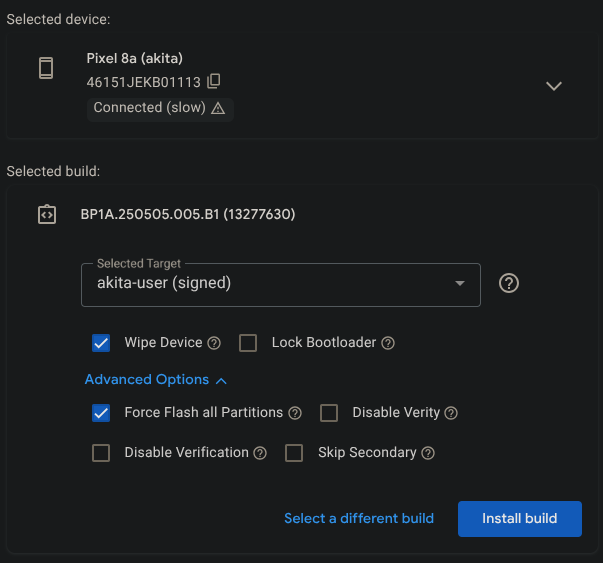
Here is the entire process. Perhaps you can spot a mistake:
There could be a bug with the build, let me check back with the developers to see if they have the bits in place to allow the bootloader to be re-locked.
The avb custom key was wrong, the right one is here : avb_custom_key-akita.bin · master · ota / betas · GitLab
Also, a new beta build is available : iode-6.7-20250919-akita-fastboot.zip · master · ota / betas · GitLab
2 Likes
That worked. I was able to lock the bootloader.
1 Like