Motorola Edge 30_Kamera und WLAN Fehler nach Installation von IodeOS

:germany: Ich habe mir ein Motorola Edge 30 gekauft Leider habe ich nicht überprüft, ob die Hardware funktioniert, sondern sofort IodeOS 7 installiert.

Mir sind dann zwei Fehler aufgefallen.

- Die Kamera 1.0 macht und zeigt nur Schwarzweißbilder an.

- Das WLAN verbindet sich bei Deaktivierung nicht mehr und lässt sich nur aktivieren, wenn man über die Einstellungen “Netzwerk” das WLAN deaktiviert und die Internetverbindungen zurücksetzt. Dann wieder das WLAN auf “An” stellt.

Ich dachte, die Hardware sei defekt, deshalb habe ich das Smartphone verschenkt. Da mir das Smartphone aber gefiel, habe ich nochmal eins gekauft und die Hardware zuvor überprüft. Alles funktionierte. Nach Installation von IodeOS 7.1 hätte ich die identischen Mängel wie beim ersten Smartphone. Meiner Meinung nach kann es nur am Betriebssystem liegen.

Sind diese Fehler bekannt? Kann man auf Abstellung hoffen?

Vielen Dank

Sandy

:united_kingdom: I bought a Motorola Edge 30 Unfortunately I did not check whether the hardware was working, but installed IodeOS 7 immediately.

I noticed two mistakes.

- The camera 1.0 takes and displays only black and white images.

- The WLAN no longer connects when deactivated and can only be activated if you deactivate the WLAN via the “Network” settings and reset the Internet connections. Then set the Wi-Fi to “On” again.

I thought the hardware was broken, that’s why I gave away the smartphone. But since I liked the smartphone, I bought another one and checked the hardware beforehand. Everything worked. After installing IodeOS 7.1, I would have the same defects as the first smartphone. In my opinion, it can only be the operating system.

Are these mistakes known? Can you hope for shutdown?

Thank you

Sandy

:germany: Gibt es tatsächlich niemanden der etwas über diese Probleme sagen kann…?

:united_kingdom: Is there really no one who can say anything about these problems?

Hi Sandy,

don’t have the same device, so can’t really tell. But I guess it would be helpful to do some more tests:

Which camera apps did you try? Do you run MicroG on the phone? Did you try another custom ROM?


ich hab kein Edge 30, deshalb kann ich nicht wirklich was dazu sagen, aber ich schätze, es wäre hilfreich, wenn Du ein paar Tests machst:

Welche Kameraapps hast Du getestet? Hast Du MicroG auf dem Smartphone laufen? Hast Du auch ein anderes Custom-ROM ausprobiert?

Hallo @MissPiggy,

Danke für die Antwort. Bei beiden Handys habe ich die Standard-Kameraapp von Iode und OpenCamera mit gleichem Ergebnis ausprobiert. Auch der WLAN-Fehler ist auf Beiden identisch gewesen. MicroG läuft. Andere Roms habe ich nicht ausprobiert. Im Originalzustand hat beides funktioniert.

Thank you for the answer. On both phones I tried the standard camera app of Iode and OpenCamera with the same result. The Wi-Fi error was also identical on both. MicroG is running. I have not tried other Romes. In the original state, both worked. That’s a test. This is still a test. This will remain a test.

Hi Sandy,

weißt Du, welche Kamera-App auf dem Stock-ROM läuft? Wäre interessant, die auch mal zu testen.

Was das WLAN-Problem angeht: Wie schaltest Du es aus? (Runterziehen von oben und auf die Kachel klicken? Keine Ahnung, wie das auf Englisch heißt.) Ich bin recht zuversichtlich, dass das eine Einstellungssache ist.

PS: OpenCamera vom allgemeinen F-Droid-Repo genommen oder die alte Version auf dem iodé-F-Droid-Repo, die nur für Altmodelle noch vorgehalten wird? (Hier erklärt.

Hallo @MissPiggy,

:germany: die ursprüngliche App finde ich nicht, habe aber mal die GCAM 9.6 von Big Kaka ausprobiert. Da ist das Bild dieser Kamera auch SW.

Beim WLAN-Problem dachte ich auch dass es an den Einstellungen liegt. Da habe ich alles Mögliche aus probiert.

Ich denke, es liegt am Betriebssystem. Ich hätte auch LineageOS mal probiert, bin aber vor kurzem komplett auf Linux umgestiegen und traue es mir zur Zeit noch nicht zu.

Denke, es wäre hilfreich wenn ein Motorola Edge 30 Nutzer die Fehler bestätigen oder dementieren würde.

:united_kingdom: I can’t find the original app, but I tried the GCAM 9.6 from Big Kaka. The picture of this camera is also SW.

With the Wi-Fi problem, I also thought it was because of the settings. I tried everything.

I think it’s up to the operating system. I would have tried LineageOS once, but recently completely switched to Linux and do not trust me at the moment.

Think it would be helpful if a Motorola Edge 30 users would confirm or deny the errors.

Auf jeden Fall. Bis dahin müssen wir uns durch die möglichen Ursachen wühlen :slightly_frowning_face:

Dass Du die GCAM auch getestet hast, schließt ja schon mal einiges aus.

Vielleicht berichtest Du noch etwas detaillierter über das WLAN-Problem. Könnte es kein generelles WLAN-Problem sein, sondern der Daten-/Netzwerkzugriff einer einzelnen App? Symbole in der Statusleiste?

**

For sure. Until then we can only try to dig through possible causes.

Good that you tested GCAM, that should narrow the path of possible causes.

Maybe you could report a little more about the Wifi problem. Could it rather be the data/network access of a single app than general Wifi problem? Symbols occurring in the status bar?

Hallo @MissPiggy,

:germany: erstmal “Danke” für deine Hilfe.

Zum WLAN-Problem:

Ich ziehe das Menü von oben herunter schalte WLAN aus. Dann wieder ein. Es verbindet sich nicht neu. Kein Symbol wird angezeigt. Ich ziehe das Menü wieder herunter, drücke auf mein WLAN. Dann kommt Gespeichert/Verbindungsfehler.

Nur wenn ich den WLAN-Schalter auf “AUS” stelle und dann oben rechts auf”Internetverbindung zurücksetzen” drücke, dann den WLAN Schalter wieder auf “AN” verschiebe, bekomme ich wieder WLAN.
Es funktioniert nur auf diesem Weg. Das habe ich sehr lange und intensiv versucht. Wie gesagt, der Fehler ist bei beiden Edge30 identisch. Sowohl Kamera und WLAN.

In meinem Netzwerk hängen 6 Smartphones inkl. Gastzugang.

:bouvet_island: First, “Thank you” for your help.

To the WLAN problem:

I drag down the menu from above switch off Wi-Fi. Then back in. It doesn’t reconnect. No icon is displayed. I pull the menu down again, press on my Wi-Fi. Then comes saved/connection error.

Only when I set the WLAN switch to “OFF” and then press “Reset Internet connection” in the upper right corner, then move the WLAN switch back to “AN”, I get Wi-Fi again.

It only works on this path. I’ve tried that very long and intensely. As I said, the error is identical for both Edge30. Both camera and Wi-Fi.

In my network hang 6 smartphones incl. Guest access.

You don’t trust Linux to flash your device, or maybe Motorola doesn’t provide the ability to flash using Linux? If the first, we can help out!

Now to your issues, from “About phone” can you confirm it is XT2203-1? There are possibly some variants that would not match, and I see LineageOS mentions only this specific model is compatible: Install LineageOS on dubai | LineageOS Wiki

I would suggest flashing stock Motorola firmware again (no need to re-lock) and check the hardware (even though I do understand you see the same results with 2 different devices, but it would be good to have a baseline). A check with LineageOS could be useful, but I suspect it will behave the same, iodé pulls in their sources when making builds.

Sorry I didn’t check but do they have an Android 16 version for the device? If not possibly the A16 / LOS 23 / iodé 7 upgrade have caused some hardware regressions? I did see on XDA Forums that there are discussions around LOS 23 builds and I didn’t see any replies matching your issues so it is strange. Maybe a stock LOS 23 flash would be in order in that case (see how I am fishing for different possibilities here but none of them seem definitive? A tricky problem).


Sie trauen Linux nicht zu, Ihr Gerät zu flashen, oder vielleicht bietet Motorola keine Möglichkeit zum Flashen unter Linux? Im ersten Fall können wir Ihnen helfen!

Nun zu Ihrem Problem: Können Sie unter „Über das Telefon” bestätigen, dass es sich um „XT2203-1” handelt? Es gibt möglicherweise einige Varianten, die nicht übereinstimmen würden, und ich sehe, dass LineageOS nur dieses bestimmte Modell als kompatibel angibt: Install LineageOS on dubai | LineageOS Wiki

Ich würde vorschlagen, die Standard-Firmware von Motorola erneut zu flashen (kein erneutes Sperren erforderlich) und die Hardware zu überprüfen (auch wenn ich verstehe, dass Sie mit zwei verschiedenen Geräten die gleichen Ergebnisse erzielen, wäre es dennoch gut, eine Basislinie zu haben). Eine Überprüfung mit LineageOS könnte nützlich sein, aber ich vermute, dass es sich genauso verhalten wird, da iodé bei der Erstellung von Builds seine Quellen einbezieht.

Entschuldigen Sie, dass ich das nicht überprüft habe, aber gibt es eine Android 16-Version für das Gerät? Wenn nicht, haben möglicherweise die Upgrades A16 / LOS 23 / iodé 7 zu einigen Hardware-Rückschritten geführt? Ich habe in den XDA-Foren gesehen, dass es Diskussionen über LOS 23-Builds gibt, und ich habe keine Antworten gesehen, die zu Ihren Problemen passen, daher ist es seltsam. Vielleicht wäre in diesem Fall ein Standard-LOS 23-Flash angebracht (sehen Sie, wie ich hier nach verschiedenen Möglichkeiten suche, aber keine davon scheint endgültig zu sein? Ein kniffliges Problem).

As far as I understood Sandy, he/she did test the camera on stock ROM before switching to iodéOS …

1 Like

Hallo @MissPiggy, @rik,
:germany:Danke für die Unterstützung. Das Telefon ist das „XT2203-1” .
Ich habe beide Smartphones mit dem Installationsprogramm geflasht. Das Erste mit iodé 7, das Zweite mit iodé 7.1. Beim Zweiten habe ich die Hardware genauestens auf die Fehler hin geprüft. Sie waren definitiv nicht vorhanden. Alle Kameras machten Farbbilder und das WLAN ließ sich problemlos ausschalten und wieder aktivieren.
Da ich das Gerät zur Zeit nicht nutze, könnte ich es auch eine Zeit lang zur Verfügung stellen.

:united_kingdom:Thanks for the support. The phone is the “XT2203-1”.

I flashed both smartphones with the installer. The first with iodé 7, the second with iodé 7.1. On the second, I checked the hardware carefully for the errors. They were definitely nonexistent. All cameras made color images and the WLAN could be switched off and activated again without any problems.

Since I am not using the device at the moment, I could also make it available for a while.

Thanks for your patience. I am still a bit behind from the holidays :slight_smile:

:canada: Are you able to cross check against an install of LineageOS? It seems like a fairly standard install, but do read through it before going ahead, maybe something stands out:

From there let’s see what you find, it will help us isolate the issues. A bit of extra work for you, but it will likely benefit other future users if you are willing.

BTW I liked your :norway: a few posts up for the English translation, maybe you are making a political statement :slight_smile: ?


:germany: Können Sie dies anhand einer Installation von LineageOS überprüfen? Es scheint sich um eine ziemlich standardmäßige Installation zu handeln, aber lesen Sie sich die Anleitung bitte durch, bevor Sie fortfahren, vielleicht fällt Ihnen etwas auf:

Schauen wir uns dann an, was Sie herausfinden, das wird uns helfen, die Probleme einzugrenzen. Das bedeutet zwar etwas mehr Arbeit für Sie, aber wenn Sie dazu bereit sind, wird es wahrscheinlich anderen zukünftigen Nutzern zugute kommen.

Übrigens hat mir Ihr :norway: ein paar Beiträge weiter oben für die englische Übersetzung gefallen, vielleicht machen Sie damit eine politische Aussage :slight_smile: ?

Hallo @rik,
:germany:leider wird die OEM Entsperrung nicht angezeigt. Das Scmartphone hängt nun seit 12 Tagen am WLAN. Ich werde noch etwas abwarten und immer wieder nachschauen.
Vieleicht kommen in der Zwischenzeit noch Informationen von anderen Motorola Edge 30 Nutzern :+1:

Nur eine nette Verwechselung :grin:

:united_kingdom: the OEM unlocking is not displayed. The smartphone has been hanging on the Wi-Fi for 12 days now. I will wait a little longer and look again and again.
In the meantime, information may come from other Motorola Edge 30 users :+1:

Just a nice confusion :grin:

:india: Wait, so you have iodéOS installed now and it is locked, but can’t “Allow OEM Unlocking”? This is bad, but that indicates you likely triggered FRP (“Factory Reset Protection”) which comes from when you do not unregister a Google account on the device before reflashing another ROM (Google then locks like this to deter thieves, but I think the main people with trouble are actual owners trying to de-Google).

When FRP is triggered, you may not be able to install apps from Aurora, is that also true?


:austria: :slight_smile: Moment, Sie haben also jetzt iodéOS installiert und es ist gesperrt, aber Sie können „OEM-Entsperrung zulassen” nicht auswählen? Das ist schlecht, aber es deutet darauf hin, dass Sie wahrscheinlich FRP („Factory Reset Protection”) ausgelöst haben, was passiert, wenn Sie ein Google-Konto nicht vom Gerät abmelden, bevor Sie ein anderes ROM neu flashen (Google sperrt dann auf diese Weise, um Diebe abzuschrecken, aber ich denke, die Hauptbetroffenen sind die tatsächlichen Besitzer, die versuchen, Google zu entfernen).

Wenn FRP ausgelöst wird, können Sie möglicherweise keine Apps von Aurora installieren, stimmt das auch?

:germany: Sicher bin ich mir nicht ob das Google Konto abgemeldet wurde. Ich habe das Gerät im zuückgesetzten Zustand bekommen und nach der OEM Entsperrung sofort IodeOS installiert. Die OEM Entsperrung ist immer noch nicht zu sehen, aber über den Aurora Store kann ich APPs herunterladen und installieren.
Kann man herausfinden ob FRP ausgelöst würde?

:england: I’m not sure if the Google account was logged out. I got the device in the reset condition and immediately installed IodeOS after the OEM unlocking. The OEM unlocking is still not visible, but through the Aurora Store I can download and install APPs.
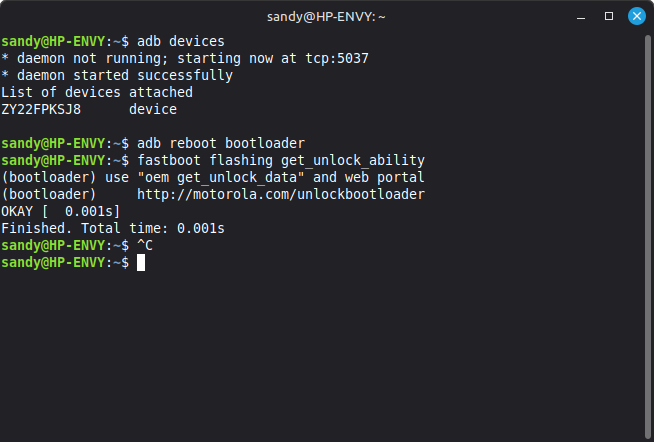
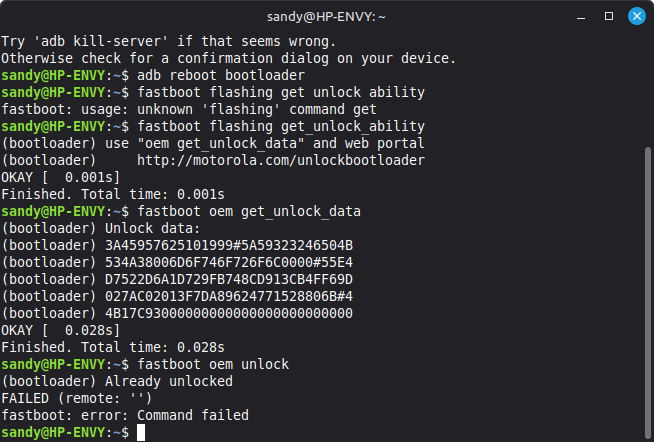
Can I find out if FRP is triggered?

I don’t know of a way to confirm or not without using adb logcat and sifting the output looking for FRP. The below post is what one user found confirming it had been triggered on their device.

Further question: I am getting confused here if your device is unlocked or locked (even if you don’t see “Allow OEM Unlocking” it may be currently unlocked)? You can confirm from fastboot with fastboot flashing get_unlock_ability.

Hallo @rik,
:germany:Es scheint immer noch entsperrt zu sein.
:england:It still seems unlocked.

OK this is a bit different with Motorola, can you try the command it offered?
fastboot oem get_unlock_data

Or more directly you can just try to unlock again and see what happens:
fastboot oem unlock

Hier das Ergebnis.
Here is the result.

I am getting confused on why we were checking all this :slight_smile: : it seems the device is unlocked so you should be able to flash to Lineage to cross check if the issues exist there?


Ich bin verwirrt, warum wir das alles überprüft haben :slight_smile: : Das Gerät scheint entsperrt zu sein, also sollten Sie in der Lage sein, Lineage zu flashen, um zu überprüfen, ob die Probleme dort bestehen?