Linux user use heimdall with recovery.img
Windows users use Odin3 to install the recovery.tar
Creating an Windows Odin3-compatible .tar recovery file: Open a PC Command Prompt (cmd) in the folder where the file was downloaded, and TAR the file by running tar --format=ustar -cvf recovery.tar recovery.img
Run Odin3 v3.13.1
In the left side of the Odin window, you will see an “Options” tab, click it, and then un-check the “Auto Reboot” option.
Check the box labeled next to the button labeled “AP”, and then click the “AP” button.
In the menu that pops up, select the newly built custom recovery .tar
Klick “Start”. A transfer bar will appear on the device showing the recovery.tar image being flashed.
Manually reboot into recovery: press the Volume Down + Power buttons for 8~10 seconds until the screen turns black & release the buttons immediately when it does, then boot to recovery:
Hi,
It’s great to hear there’s an unofficial Iodé OS 7 build for the Galaxy 9. Thank you very much for that! Will this build also receive OTA updates, and do you think it will become an official release?
@ronnz98 has probably produced a thousand different ROMs by now and is definitely ready for the Guinness Book of World Records. But so far, not a single ROM with OTA update support has been released. If we’re lucky, @ronnz98 might change his strategy one day. As of today, you’d be lucky to get any update at all for the Galaxy 9 family.
A while back, I inspired @Colors and @Chr to implement OTA support—and they both managed to do it. I’m not sure how. @rik is also a knowledgeable person to contact
@rik Is there any easy way we could let @ronnz98 use the l4m OTA and download server. Or can you help him set up OTA updates from whatever server he uses to delu er his builds. Is it just a case of running a docker image with lineage-ota or the simple-ota we use?
@ronnz98 we had to re-work how the OTA server portion worked just last month due to the “V2 format” pushed out by LineageOS (for only new A16+ builds so far). This had me go back to the slightly more complicated but more robust LineageOTA project. Don’t be too intimidated, it is essentially a docker container that “just works” when running on a server. If your builds set the OTA address, the OTA address is available via subdomain setup (we use “Caddy”) and this container is running then it is working.
As you use Sourceforge right now for hosting the builds this may be a bit of a challenge, but I think (??) one of the users @iodysseus is referring to has OTA service working with sourceforge hosted builds (??). If so that is the person we need to know a bit more from.
Pete and I would like to open up L4M to host more community builds, but we don’t have storage currently. We are going to make some inquiries to see if we can get this expanded, then let’s see from there.
This sourceforge project makes the LineagOS 4 microG GSI (no relation to the LineageOS for microG project, though I think we should be recommending it to users who have devices with no device-specific L4M build) that I use on my Sony Xperia 10 iii (which has no LineageOS build, official or unofficial).
The developer has implemented OTA updates (I think with the help / inspriation of @iodysseus - thanks!). Maybe worth getting in touch to find out how they achieve that
Which server and web hosting providers, preferably in the EU or at least in continental Europe, are suitable for hosting an OTA update project such as * LineageOS-for-microG (411 directories)?
What costs should be expected?
With careful financial planning, the costs could be deducted from income tax as a donation or as business expenses.
That download server is hosted by SysEleven in Germany (who very generously sponsor the LineageOS for microG project by providing the virtual servers we use for making and publishing builds at no cost).
The builds are stored on a cloud VM with a 1.4TB storage volume attached. The VM is not very powerful (2 vCPUs, 16GB RAM, 50GB system disk) as its only tasks are to
serve the project website (only a single page)
host the downloads
run a couple of docker images which provide the OTA functionality
The big ‘cost’ is the volume storage: we have 1.4TB which is currently 91% full. At current prices, I think the cost of such storage from an EU-based provider wouls be ~200EUR / month.
But our server hosts builds for over 300 different device / OS combinations, with 2 or 3 builds per device for the most recent devices (~250) and 1 build per device for older devices. To serve downloads and updates for a small number of devices, you would obviously not need so much storage. Nor would you need so many CPUs or so much memory: one of the lower-spec cloud VMs from e.g. Krystal.io (UK-based but with EU-based servers available) could probably do the job at around £20-£30 per month).
Alternatively, it is possible to host downloads, (and enable OTA updates) for smaller projects on SourceForge at no cost. I use this ‘LineageOS 4 microG’ GSI linked in my earlier post (no relation to the LineageOS for microG project ) which provides OTA updates.
@petefoth Thank you for your detailed explanations. My ability to sponsor an OTA update project for at least a year is, of course, limited—I can’t afford ~200 EUR per month. Perhaps sponsors can be found for a Krystal io (UK-based) project in the £20–£30 per month range. I’d be on board.
@rik Please let me know how much the planned storage expansion is expected to cost. I can contribute to the costs with a one-time sponsorship payment each year.
Thank you for the offer, but nothing is yet ‘planned’. Exploring the possibility of increased storage is on our ‘To Do’ list. When we do get round to spending time on it, our first action will be to discuss it with our existing sponsors (which will of course not be done in any public forum ).
PS I know your query was addressed to @rik, but he and I work closely together on the LineageOS for microG project, and we are agreed on this approach to the increased storage issue.
@petefoth it’s good to know that you and @rik are working together. I’ll stick to the few ways I can elp. One way is through my small sponsorship budget. If you ever need funding to offer unofficial customROMs via OTA updates, feel free to post a public call for donations here. I’ll definitely chip in.
For our LineageOS for microG build system, we were already adjusting this a bit differently and the end builder doesn’t directly have us set lineage.updater.uri in our config file but instead we set this in our build script this way:
We use the pf-build-iodeOS branch in that repo for the unofficial iodé builds (to automate version changes, pulling in iodé source etc). Here is the example from an input config file to run that docker build container branhc:
 @ronnz98 iodeOS 7.5 builds for testing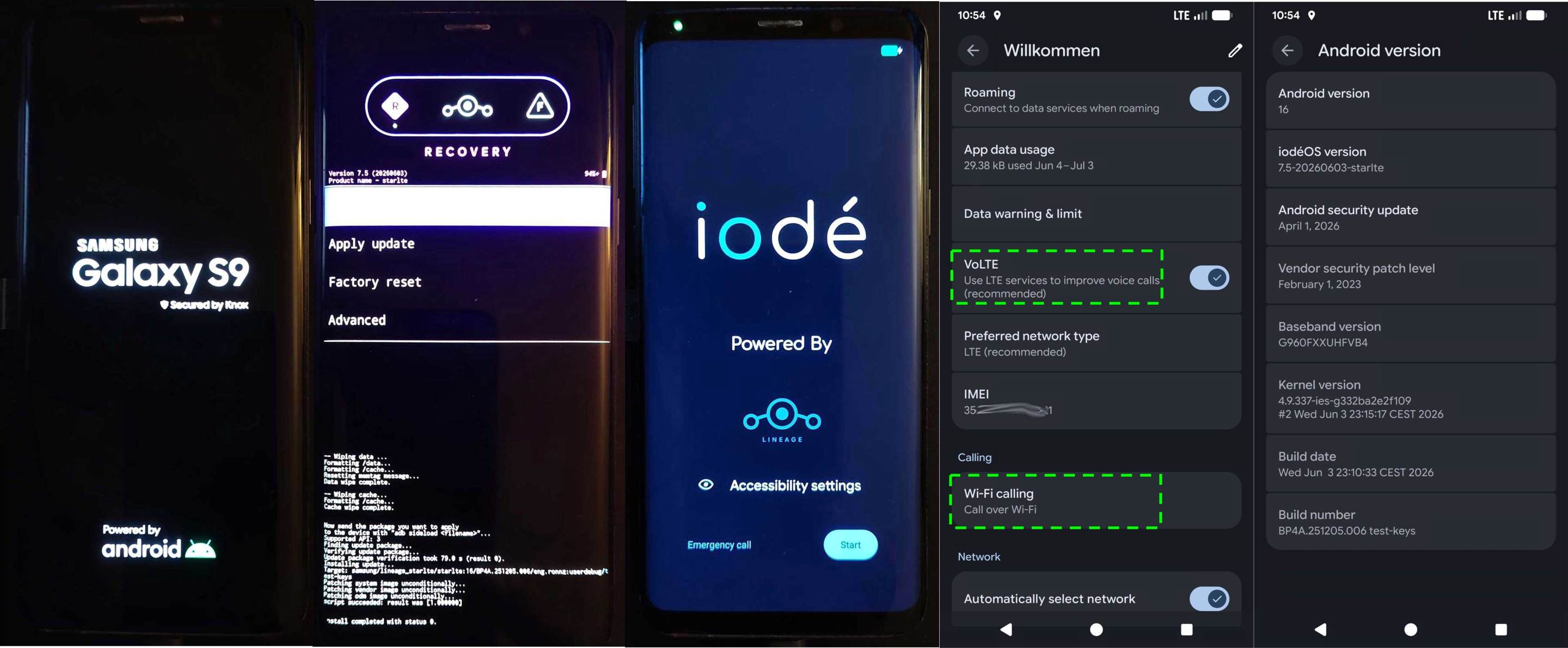
 and
and  ) which provides OTA updates.