Hi Forum
I am considering to buy a Samsung Galaxy Tab S11.
For installing Iodé I assume I need to do the following:
1/ Unlock bootloader
2/ Flash Iodé GSI
Would anyone have some experience/tips/tricks here to share?
Hi Forum
I am considering to buy a Samsung Galaxy Tab S11.
For installing Iodé I assume I need to do the following:
1/ Unlock bootloader
2/ Flash Iodé GSI
Would anyone have some experience/tips/tricks here to share?
Is the bootloader able to be unlocked? I believe newer Samsung devices do not support bootloader unlocking?
That’s a first key issue. I do not know. Did not buy it yet.
Personally I would only look to devices with official LineageOS builds. Then you know it has the support you want. The Galaxy Tab S7 (supported by iodéOS) is still an amazing tablet, by the way!
Got that, but…
Suppose bootloader of S11 is unlockable, and unlocked, is flashing GSI the next step?
(I found that unlockability of S11 is region specific)
No, because iodéOS 5.27 A14 cannot be installed on a device running Android 16.
The Galaxy Tab S11 comes with Android 16 and One UI 8.5 preinstalled. The bootloader can no longer be unlocked as it could in the past.
In general: Only use GSI images with an Android version that’s higher or equal to the version of Android that came with your device.
Here I observe a difficulty
The GSI instryctions seem not to give that info about Android versions (I did not not find it)
The Iodé GSI installation instructions say “Check Project Treble support
Use tools like Treble Info (available on F-Droid) to confirm your device is Treble-compatible and supports GSI.”
Trouble is that the Treble app is only helpful if you own the machine for which you consider GSI. In my case I do not have the Tab 11, merely consider a purchase
Since 2024, there has been only one iodéOS GSI version: iode-5.x
iode-5.x corresponds to AOSP 14
iode-6.x corresponds to AOSP 15
iode-7.x corresponds to AOSP 16
iode-4.x corresponds to AOSP 13
iode-3.x corresponds to AOSP 12
iode-2.x corresponds to AOSP 11
I mean, instructions do not tell us to “ Only use GSI images with an Android version that’s higher or equal to the version of Android that came with your device.”
That is not an obvious idea, or is it?
I would strongly … very strongly, in fact, NOT considering device purchases that don’t have a track record of running LineageOS on it before purchasing, especially if your goal is to only use it for a LineageOS-based solution, or if you are not a dev that may be purchasing it to create the port yourself.
Even if you can find an amazing deal on a device, it won’t be that good of a deal when it sits unused in a drawer … 
Thx Rik, that was already clear to me. My previous 2 reactions were merely intended as a suggestion to improve guidelines that are present on the Iodé website where GSI is explained and promoted.
Things that appear ‘obvious’ to people very close to the developers are not really so for those who only occasionally have the guts to implement a new OS.
But your warning is very much appreciated indeed!
The following doesn’t help if you don’t have possession of a desired device, but for future reference, there should be a service code you can dial to see service/configuration information and whether the bootloader can be unlocked or not.
On Sonys, for instance, it’s *#*#SERVICE#*#*. (Only works on stock Android, I believe.) I don’t know what the code is for Samsungs. But, as has already been said, the Tab S11 appears to be excluded for your purposes.
EDIT: “I don’t know what the code is for Samsungs.”
Perhaps something here: https://xdaforums.com/t/dial-codes-android-and-samsung.4445813/
My personal take is this: “if you already have a device that doesn’t have a build available for it, then maybe the GSI will be minimally viable to extend its life instead of binning it, but it isn’t a good option to buy a device for use with iodéOS that doesn’t have a proper build available for it.”
There may be firmware compatibility issues with a GSI build depending on the device, from telephony issues, camera issues, battery optimization, etc., which is why we maintain a list of what is working and what isn’t. I’ll discuss with the team how we may want to clarify some of this on our documentation,
11" FHD IPS Display 90Hz | MediaTek Helio G99 (MT6789)
8/256 GB | 7850mAh Akku | 4G LTE Dual SIM | BT 5.2
The material mix of glass and metal feels very good and gives the device a high-quality impression. The slim design (258.4*169.9*7.5 mm) emphasizes the light weight of 470 grams.
The AGM PAD P2 may not be able to compete with the Samsung Galaxy Tab S11 (SM-X736B) in terms of technical specifications, but in practical use, it shows itself to be powerful enough.
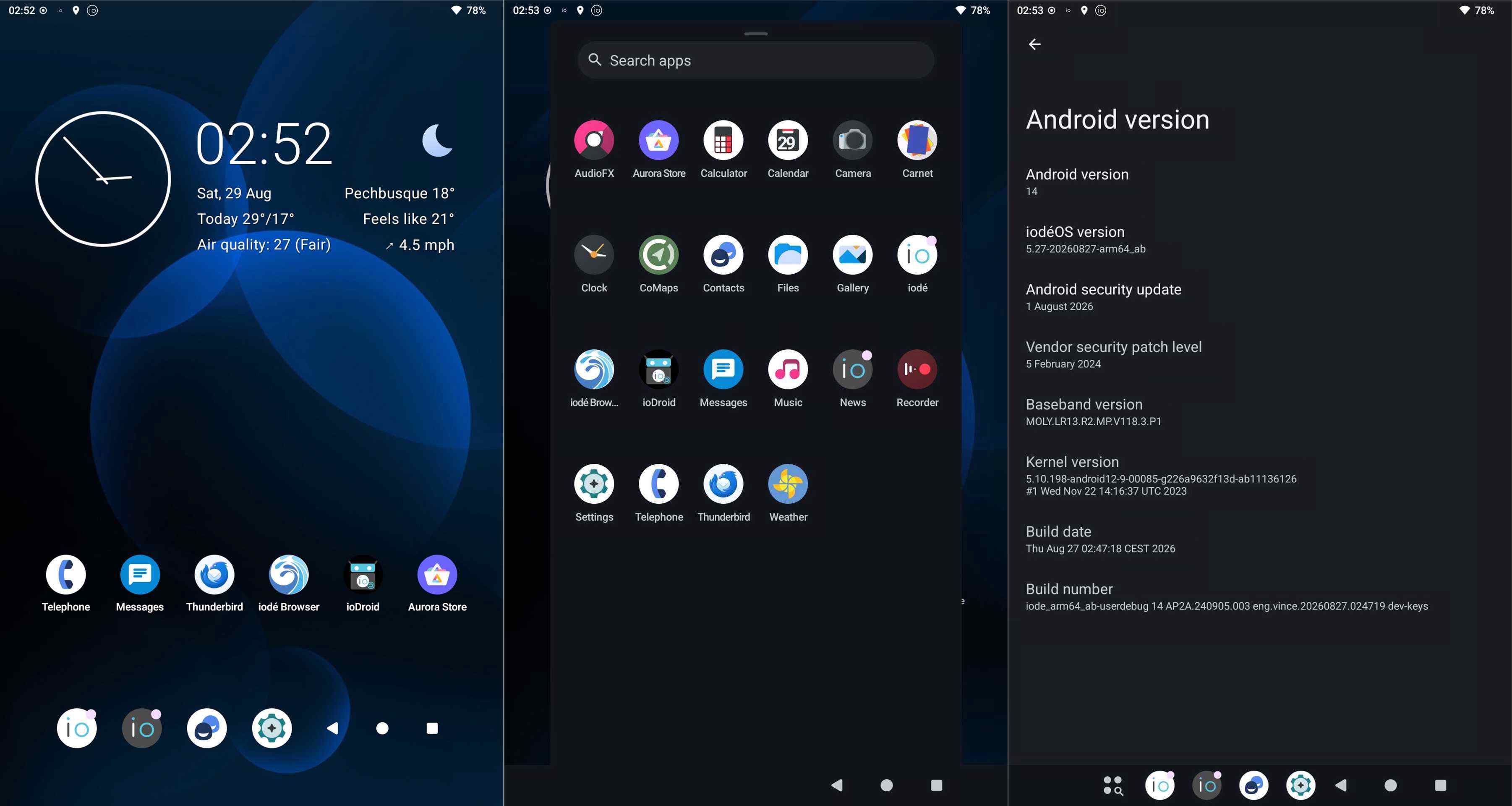
GSI (A14) iode-5.27-20260827-arm64_ab (beta) runs on my AGM PAD P2 as well as a custom ROM. However, this is not the rule, but there are no rules without exceptions: Although the technical specifications suggest otherwise, I’m unable to perform an OTA update in practice. This handicap also applies to other devices I own that are equipped with a MediaTek Helio G99 (MT6789) chipset. This is not due to the GSI, as extensive tests I’ve conducted have shown.
 If anyone has a solution, please let me know.
The advantage of this 11” tablet is that it is almost 3-4 times cheaper than a (Murena) Volla tablet (Helio G99 (MT6789)) and 5-6 times cheaper than a Samsung Tab S11 5G, 12/256 GB in terms of retail price.
I am going to be given (not purchased) an old Samsung Tab Galaxy A (SM-T510). On @rik ‘s advice, I have checked Lineage compatibility list, and unfortunately the de device is not there. And limeade people seem to be strict as to “similar” is not enough. In the list there is Samsung Galaxy TAB A 8.0, which seems to be the closest model I have been to find there to my model. Could there still be a chance of Iodé working on it, or better not even bother?
Are you able to unlock the bootloader? For possible “unofficial LineageOS” development you can can xdaforums for the device.