My phone, a OnePlus 9 5g with latest IodéOS, is out of order after a long time in wet area  I’ve done a SeedVault backup some weeks ago on an external USB stick. I’ve took my old phone, a Samsung A5 2017, installed the IodéOS on it (in version 2.44), and tried to restore my SeedVault backup, but when I select my USB stick, it tells me it doesn’t find any backup on it : is this restoration possible ? Or the SeedVault backup is tied to a specific IodéOS or Android version ?
Seedvault backups are kept in a hidden directory, .SeedVaultAndroidBackup (you will need to show hidden files to see it using the default file browser). Each device backup is then kept in a unique sub-directory there.
If your goal is to restore from another device, then possibly your target device created a different sub-folder under that directory and is thus using it. A simple fix would be to “clear storage” for Seedvault, then before you start it again make sure the .SeedVaultAndroidBackup folder (with the data you want to restore under a subfolder there) is put in place. Then start SeedVault and it should be found to give an option to restore.
Hi !
I’ve done my SeedVault backup on an external USB stick, and yes, I wanted to restore it on another phone, as my main one is probably dead. When trying to restore the SeedVault on the old phone, the system is well detecting my USB stick, making its name selectable, but then it says there is no backup on it…
I’ve checked the USB stick with a laptop, and I can see the given .SeedVaultAndroidBackupdirectory, but I can’t say much if it’s content is correct or not…
I am slightly confused, but what I suggest you do is move / copy the directory from the USB to your Android home/.SeeVaultAndroidBackup folder then start SeedVault to restore. Is this what you are trying?
I guess Actarien tried to restore the data from the USB stick. This usually works, I did it when moving from CalyxOS to iodéOS - restoring the data via Seedvault from the backup USB stick.
I guess the Seedvault version on the very old phone is too old to detect the backup on the stick. Which version is the Seedvault app on the A5?
1 Like
Yes, MissPiggy, it’s exactly what I tried.
I looked for information about Seedvault on the A5 phone, without success, it’s not an application but included in the system I think. On the A5, I’ve installed IodeOS version 2 (2.44), whereas I built my Seedvault backup on my OnePlus9 with IodeOS version 7 (7.5 or 7.6 I guess, the april 2026 version).
Probably the Seedvault format changed between these versions, and become incompatible with older systems…
Thanks anyway for your help
settings → search for “backup” (German: Sicherung) → Seedvault backup → three dots on the top right → about
(I have iodéOS 7.5 and it is Seedvault build 16-5.8)
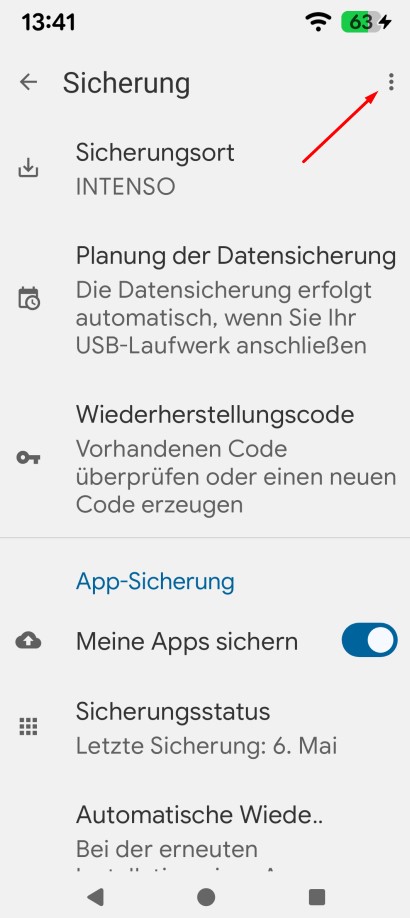
I’ve pondered a little more about that. When I set up my very first smartphone in 2024 (same device as today, but with CalyxOS), Seedvault used to be a seperate app, with an app button on the desktop (launcher?).
Later, they integrated it somehow into the system, so that there was no seperate app visible anymore (hence you cannot find it in the “preinstalled apps” section anymore and it will not show there if you search for the key word “seedvault”.
So maybe your old device still has the “old form” of seedvault and thus is not compatible with your modern day backup.
On my old phone with IodeOS v2, I don’t have three dots to know about Seedvault version, sorry !
As you say, probably the versions are too different to use backup on a IodéOS v2, done on a IodéOS v7.X.
Sorry I don’t have other advice. It could be as you say, but if it is the problem of not being able to navigating to the backup on the USB drive, you could do as I suggested and “force replace” your .SeedvaultBackup folder and then try to see if it can be restored? (I thought I had tested that?  )
)