My Pixel 6a (I had CalyxOS installed) froze 2x during installation while it said < waiting for any device >. First time I just did not activate USB-debugging, but now I did. It afterwards successfully connected, I did the bootloader unlock and factory reset. Then it went from Fastboot Mode into Fastbootd (with Lineage logo) so I guess some first migration to Lineage data worked.
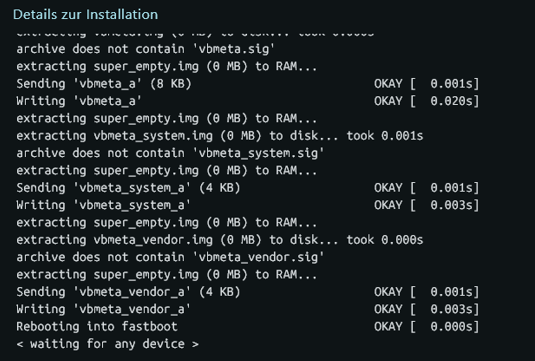
Now it again got stuck at < waiting for any device >. It looked like this:
Stuck at fastbootd, it did not do anything anymore.
I then closed the installed and thought I will just manually continue from here, which probably is the step I have to sideload the OS. But I did not find any official manual installation guide and with the auto installer I got stuck obviously … now that I am stuck randomly in the middle I probably cant continue with auto installer and must do the last part manually.
But now I have no clue where I must catch on. I downloaded iode-7.1-20251225-bluejay-fastboot and can find a windows folder, but inside I see nothing that is on par with guides I find online. Therefore, any help how to now continue from this step?
Also why it randomly stopped working? Device manager shows my phone correctly, I could see it ad adb devices and now (stuck at) fastboot devices and the process worked until here.
EDIT:
I now found that I have to run flash-all.bat. It did something and now I again came to FASTBOOTD with the Lineage logo and it is stuck here and the CMD screen saying < waiting for any device >.
I got some feedback from our lead developer regarding the versions of adb and fastboot bundled in the graphical installer:
The fasboot version used in the install script is the one which is compiled during the build of the system, so the most appropriate one. It is embedded in the install package and explicitly used by the install script. Installing another version is useless: it won’t be used by the installer.
So it seems the only relevant part of the above script is the “Google USB Driver for Windows” update. The script is just downloading and installing it from here:
But I am a bit confused. Instead of direct downloading with the link above, if you navigate to https://developer.android.com/studio/run/win-usb and then click “Download the Google USB Driver ZIP file” it isn’t an exact match? The actual .dll files are the same, but the dl.google.com direct download link includes this disclaimer in a NOTICE.txt file not found if you use the developer.android.com download:
The .dll files here are distributed by Microsoft Corporation as part of the
Windows Driver Kit (available at http://www.microsoft.com/whdc/resources/downloads.mspx) and included here as
permitted by the Microsoft Software License Terms.
Whatever I guess since the actual .dlls seem identical we don’t really care?
I had the same issue as Annoyer, but just on my Pixel 8a. I solved it by following the install instructions at GrapheneOS ( Web installer | Install | GrapheneOS ). I installed additional driver by the windows update tool.
 I guess since the actual