Hi, I used the installer flash iode on my G32 which ended successfully and asked whether I wanted to lock the bootloader. I guess I was a bit slow in answering so it defaulted to No and ended. The phone boots successfully into iode.
I went back into fastboot mode and used the command 'fastboot flashing lock, which seemed to succeed as it flashed a message ‘Bootloader is now locked’.
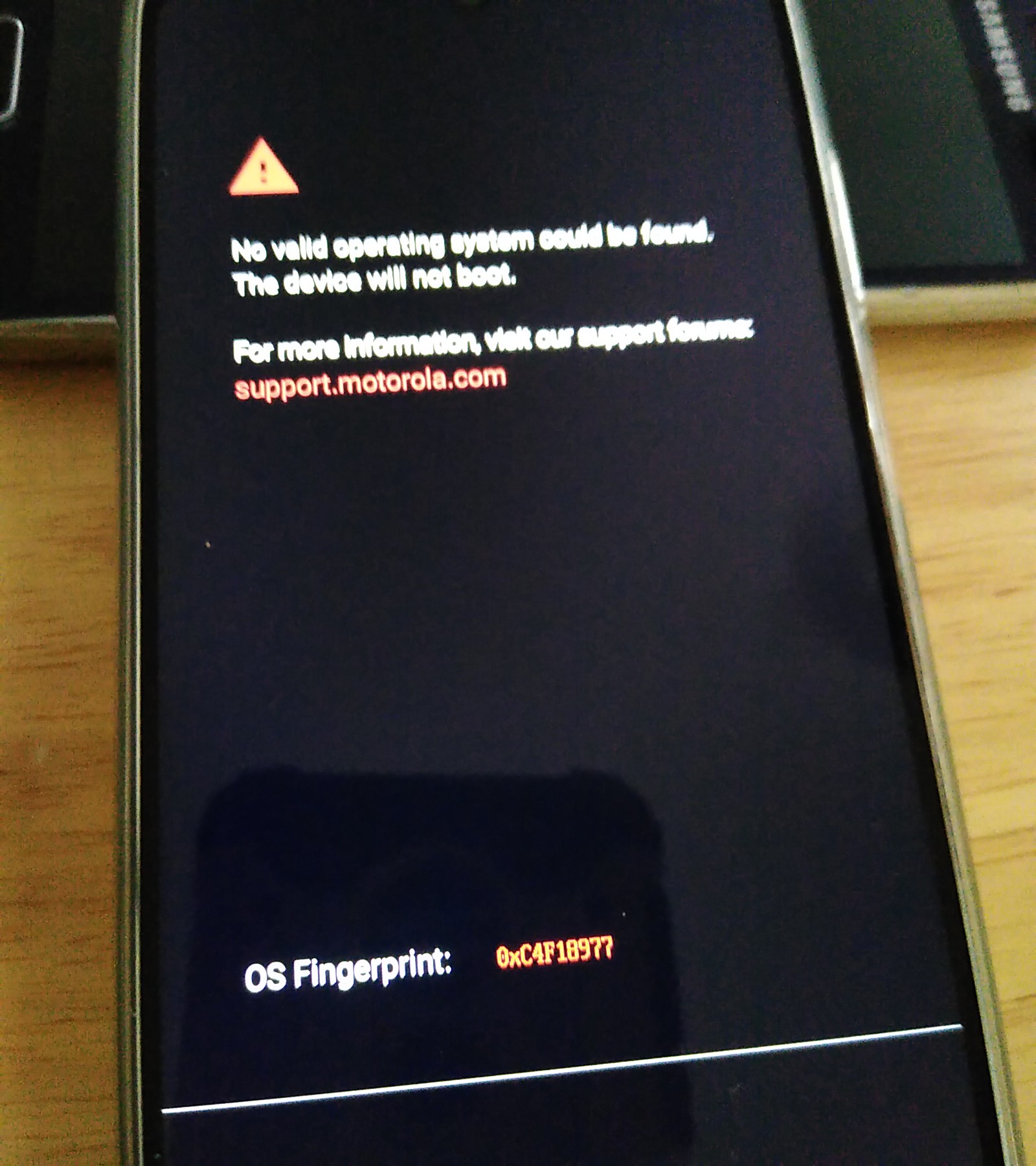
However when I reboot the phone it immediately shows a message saying ‘No valid operating system can be found on this device, The device will not boot’
Back into bootloader mode and entered ‘fastboot flashing unlock’ which ended successfully and the phone now boots.
Any idea what I’m doing wrong?
Thanks
Doug
I have the M G32, too. I, too, was too slow to react for the “lock the bootloader?”-prompt (only a few seconds, could really be improved).
What did I do? I just flashed it once more, that is: I ran the installation process again from the beginning. Except that I did not have to unlock the bootloader any more like at first run. This second time I was prepared for the “lock again?”-prompt. Worked very well.
1 Like
Thanks, I did think if doing that but thought I’d ask first! I’ll give it a go tomorrow.
Well I ran the installation process again, this time I selected “Lock bootloader” at the end. Same result as before, the phone won’t boot.
I installed again, this time I selected bootloader unlocked. I got a message that the installation had failed but the phone nevertheless booted into iode.
Seem if I lock the bootloader my phone won’t boot. Any ideas?
Thanks
1 Like
Strange, especially since we have the same phone model …
1 Like
I don’t know if you are willing to re-try this, but I wonder if you could install via command line (run the flash-all.sh (or .bat) when at the bootloader, and post the output.
Thanks, I’ll give it a go.
Hi, I installed via the command line in linux and it seemed to complete without error. I selected lock bootloader and then started the phone and it went straight to the error “No valid operating system found. The device will not boot.”
I attach the output:
doug@doug-aspirem1930:~/adb-fastboot/iode-6.6-20250729-devon-fastboot$ sh flash-all.sh
Erasing 'avb_custom_key'                           OKAY [  0.015s]
Finished. Total time: 0.016s
Warning: skip copying avb_custom_key image avb footer (avb_custom_key partition size: 0, avb_custom_key image size: 1032).
Sending 'avb_custom_key' (1 KB)                    OKAY [  0.002s]
Writing 'avb_custom_key'                           OKAY [  0.014s]
Finished. Total time: 0.018s
Warning: userdata type is raw, but f2fs was requested for formatting.

   F2FS-tools: mkfs.f2fs Ver: 1.16.0 (2023-04-11)

Info: Debug level = 1
Info: Trim is disabled
Info: Set conf for android
Info: Enable Project quota
Info: not exist /proc/version!
Info: Segments per section = 1
Info: Sections per zone = 1
Info: sector size = 512
Info: total sectors = 105967576 (51741 MB)
Info: zone aligned segment0 blkaddr: 512
Info: add quota type = 0 => 4
Info: add quota type = 1 => 5
Info: add quota type = 2 => 6
Info: format version with
 "6.8.0-83-generic"
[f2fs_init_sit_area: 714]       Filling sit area at offset 0x00600000
[f2fs_init_nat_area: 748]       Filling nat area at offset 0x00a00000
[f2fs_add_default_dentry_root:1364]     Writing default dentry root, at offset 0x15a00
[f2fs_write_root_inode:1410]    Writing root inode (hot node), offset 0x15400
[f2fs_write_default_quota:1502]         Writing quota data, at offset 00015a01 (1/2)
[f2fs_write_default_quota:1502]         Writing quota data, at offset 00015a02 (2/2)
[f2fs_write_qf_inode:1553]      Writing quota inode (hot node), offset 0x15401
[f2fs_write_default_quota:1502]         Writing quota data, at offset 00015a03 (1/2)
[f2fs_write_default_quota:1502]         Writing quota data, at offset 00015a04 (2/2)
[f2fs_write_qf_inode:1553]      Writing quota inode (hot node), offset 0x15402
[f2fs_write_default_quota:1502]         Writing quota data, at offset 00015a05 (1/2)
[f2fs_write_default_quota:1502]         Writing quota data, at offset 00015a06 (2/2)
[f2fs_write_qf_inode:1553]      Writing quota inode (hot node), offset 0x15403
[f2fs_update_nat_default:1591]  Writing nat root, at offset 0x00000a00
Info: Overprovision ratio = 0.640%
Info: Overprovision segments = 169 (GC reserved = 163)
[f2fs_write_check_point_pack: 939]      Writing main segments, cp at offset 0x00000200
[f2fs_write_check_point_pack:1027]      Writing Segment summary for HOT/WARM/COLD_DATA, at offset 0x00000201
[f2fs_write_check_point_pack:1041]      Writing Segment summary for HOT_NODE, at offset 0x00000202
[f2fs_write_check_point_pack:1053]      Writing Segment summary for WARM_NODE, at offset 0x00000203
[f2fs_write_check_point_pack:1067]      Writing Segment summary for COLD_NODE, at offset 0x00000204
[f2fs_write_check_point_pack:1075]      Writing cp page2, at offset 0x00000205
[f2fs_write_check_point_pack:1095]      Writing NAT bits pages, at offset 0x000003fe
[f2fs_write_check_point_pack:1117]      Writing cp page 1 of checkpoint pack 2, at offset 0x00000400
[f2fs_write_check_point_pack:1136]      Writing cp page 2 of checkpoint pack 2, at offset 0x00000405
[f2fs_write_super_block:1169]   Writing super block, at offset 0x00000000
Info: format successful
Warning: skip copying userdata image avb footer due to sparse image.
Sending 'userdata' (97 KB)                         OKAY [  0.004s]
Writing 'userdata'                                 (bootloader) flash permission denied
FAILED (remote: '')
fastboot: error: Command failed
Warning: skip copying modem_a image avb footer due to sparse image.
Sending 'modem_a' (75524 KB)                       OKAY [  1.965s]
Writing 'modem_a'                                  OKAY [  0.519s]
Finished. Total time: 2.487s
--------------------------------------------
Bootloader Version...: MBM-3.0-devon_g-8847829342a-250521
Baseband Version.....: HAK11_15.154.01.90R DEVON_EUDSDS_CUST
Serial Number........: ZY22FXF6SG
--------------------------------------------
extracting android-info.txt (0 MB) to RAM...
Checking 'product'                                 OKAY [  0.000s]
Setting current slot to 'a'                        OKAY [  0.203s]
extracting fastboot-info.txt (0 MB) to RAM...
extracting super_empty.img (0 MB) to RAM...
extracting super_empty.img (0 MB) to disk... took 0.000s
(bootloader) super-partition-name: not found
Writable partitions are not supported
extracting super_empty.img (0 MB) to RAM...
extracting super_empty.img (0 MB) to RAM...
extracting super_empty.img (0 MB) to RAM...
extracting super_empty.img (0 MB) to RAM...
extracting super_empty.img (0 MB) to RAM...
extracting super_empty.img (0 MB) to RAM...
extracting super_empty.img (0 MB) to RAM...
extracting super_empty.img (0 MB) to RAM...
extracting super_empty.img (0 MB) to RAM...
extracting super_empty.img (0 MB) to RAM...
extracting super_empty.img (0 MB) to RAM...
extracting boot.img (96 MB) to disk... took 0.368s
archive does not contain 'boot.sig'
extracting super_empty.img (0 MB) to RAM...
Sending 'boot_a' (98304 KB)                        OKAY [  2.599s]
Writing 'boot_a'                                   OKAY [  1.568s]
extracting super_empty.img (0 MB) to RAM...
extracting dtbo.img (24 MB) to disk... took 0.061s
archive does not contain 'dtbo.sig'
extracting super_empty.img (0 MB) to RAM...
Sending 'dtbo_a' (24576 KB)                        OKAY [  0.654s]
Writing 'dtbo_a'                                   OKAY [  0.108s]
extracting super_empty.img (0 MB) to RAM...
extracting vendor_boot.img (96 MB) to disk... took 0.268s
archive does not contain 'vendor_boot.sig'
extracting super_empty.img (0 MB) to RAM...
Sending 'vendor_boot_a' (98304 KB)                 OKAY [  2.598s]
Writing 'vendor_boot_a'                            OKAY [  0.508s]
extracting super_empty.img (0 MB) to RAM...
extracting vbmeta.img (0 MB) to disk... took 0.000s
archive does not contain 'vbmeta.sig'
extracting super_empty.img (0 MB) to RAM...
Sending 'vbmeta_a' (8 KB)                          OKAY [  0.001s]
Writing 'vbmeta_a'                                 (bootloader) WARNING: vbmeta_a anti rollback downgrade, 27 vs 29
OKAY [  0.008s]
extracting super_empty.img (0 MB) to RAM...
extracting vbmeta_system.img (0 MB) to disk... took 0.000s
archive does not contain 'vbmeta_system.sig'
extracting super_empty.img (0 MB) to RAM...
Sending 'vbmeta_system_a' (4 KB)                   OKAY [  0.001s]
Writing 'vbmeta_system_a'                          (bootloader) WARNING: vbmeta_system_a anti rollback downgrade, 27 vs 29
OKAY [  0.009s]
Rebooting into fastboot                            OKAY [  0.001s]
< waiting for any device >
extracting super_empty.img (0 MB) to disk... took 0.000s
Sending 'super' (4 KB)                             OKAY [  0.001s]
Updating super partition                           OKAY [  0.027s]
Resizing 'system_a'                                OKAY [  0.005s]
Resizing 'system_ext_a'                            OKAY [  0.005s]
Resizing 'product_a'                               OKAY [  0.005s]
Resizing 'vendor_a'                                OKAY [  0.005s]
extracting super_empty.img (0 MB) to RAM...
extracting system.img (930 MB) to disk... took 4.685s
archive does not contain 'system.sig'
Resizing 'system_a'                                OKAY [  0.006s]
Sending sparse 'system_a' 1/4 (262096 KB)          OKAY [  7.145s]
Writing 'system_a'                                 OKAY [  0.696s]
Sending sparse 'system_a' 2/4 (262056 KB)          OKAY [  7.276s]
Writing 'system_a'                                 OKAY [  0.720s]
Sending sparse 'system_a' 3/4 (261980 KB)          OKAY [  7.240s]
Writing 'system_a'                                 OKAY [  0.707s]
Sending sparse 'system_a' 4/4 (163608 KB)          OKAY [  4.565s]
Writing 'system_a'                                 OKAY [  0.461s]
extracting super_empty.img (0 MB) to RAM...
extracting system_ext.img (456 MB) to disk... took 2.081s
archive does not contain 'system_ext.sig'
Resizing 'system_ext_a'                            OKAY [  0.005s]
Sending sparse 'system_ext_a' 1/2 (260450 KB)      OKAY [  7.210s]
Writing 'system_ext_a'                             OKAY [  1.093s]
Sending sparse 'system_ext_a' 2/2 (203284 KB)      OKAY [  5.660s]
Writing 'system_ext_a'                             OKAY [  0.526s]
extracting super_empty.img (0 MB) to RAM...
extracting product.img (1053 MB) to disk... took 5.127s
archive does not contain 'product.sig'
Resizing 'product_a'                               OKAY [  0.006s]
Sending sparse 'product_a' 1/5 (261964 KB)         OKAY [  7.245s]
Writing 'product_a'                                OKAY [  0.662s]
Sending sparse 'product_a' 2/5 (262060 KB)         OKAY [  7.219s]
Writing 'product_a'                                OKAY [  0.684s]
Sending sparse 'product_a' 3/5 (262044 KB)         OKAY [  7.220s]
Writing 'product_a'                                OKAY [  0.653s]
Sending sparse 'product_a' 4/5 (261865 KB)         OKAY [  7.231s]
Writing 'product_a'                                OKAY [  0.675s]
Sending sparse 'product_a' 5/5 (26116 KB)          OKAY [  0.719s]
Writing 'product_a'                                OKAY [  0.134s]
extracting super_empty.img (0 MB) to RAM...
extracting vendor.img (473 MB) to disk... took 2.153s
archive does not contain 'vendor.sig'
Resizing 'vendor_a'                                OKAY [  0.005s]
Sending sparse 'vendor_a' 1/2 (261897 KB)          OKAY [  7.210s]
Writing 'vendor_a'                                 OKAY [  0.650s]
Sending sparse 'vendor_a' 2/2 (221024 KB)          OKAY [  5.933s]
Writing 'vendor_a'                                 OKAY [  0.597s]
Finished. Total time: 140.395s
Erasing 'userdata'                                 OKAY [  0.058s]
Finished. Total time: 0.067s
Sending 'abl_a' (332 KB)                           OKAY [  0.010s]
Writing 'abl_a'                                    OKAY [  0.006s]
Finished. Total time: 0.036s
Warning: skip copying bluetooth_a image avb footer due to sparse image.
Sending 'bluetooth_a' (792 KB)                     OKAY [  0.024s]
Writing 'bluetooth_a'                              OKAY [  0.008s]
Finished. Total time: 0.039s
Sending 'devcfg_a' (123 KB)                        OKAY [  0.005s]
Writing 'devcfg_a'                                 OKAY [  0.006s]
Finished. Total time: 0.023s
Sending 'dsp_a' (32768 KB)                         OKAY [  0.992s]
Writing 'dsp_a'                                    OKAY [  0.078s]
Finished. Total time: 1.210s
Warning: skip copying fsg image avb footer (fsg partition size: 0, fsg image size: 18472960).
Sending 'fsg' (18040 KB)                           OKAY [  0.529s]
Writing 'fsg'                                      FAILED (remote: 'No such file or directory')
fastboot: error: Command failed
Sending 'hyp_a' (507 KB)                           OKAY [  0.014s]
Writing 'hyp_a'                                    OKAY [  0.012s]
Finished. Total time: 0.067s
Sending 'keymaster_a' (507 KB)                     OKAY [  0.016s]
Writing 'keymaster_a'                              OKAY [  0.009s]
Finished. Total time: 0.043s
Sending 'logo_a' (10544 KB)                        OKAY [  0.297s]
Writing 'logo_a'                                   OKAY [  0.035s]
Finished. Total time: 0.384s
Sending 'prov_a' (251 KB)                          OKAY [  0.012s]
Writing 'prov_a'                                   OKAY [  0.008s]
Finished. Total time: 0.033s
Sending 'qupfw_a' (75 KB)                          OKAY [  0.004s]
Writing 'qupfw_a'                                  OKAY [  0.006s]
Finished. Total time: 0.021s
Sending 'rpm_a' (507 KB)                           OKAY [  0.020s]
Writing 'rpm_a'                                    OKAY [  0.008s]
Finished. Total time: 0.043s
Sending 'storsec_a' (123 KB)                       OKAY [  0.004s]
Writing 'storsec_a'                                OKAY [  0.006s]
Finished. Total time: 0.022s
Sending 'tz_a' (4091 KB)                           OKAY [  0.112s]
Writing 'tz_a'                                     OKAY [  0.027s]
Finished. Total time: 0.168s
Sending 'uefisecapp_a' (2043 KB)                   OKAY [  0.062s]
Writing 'uefisecapp_a'                             OKAY [  0.023s]
Finished. Total time: 0.105s
Sending 'xbl_config_a' (251 KB)                    OKAY [  0.011s]
Writing 'xbl_config_a'                             OKAY [  0.009s]
Finished. Total time: 0.033s
Sending 'xbl_a' (5115 KB)                          OKAY [  0.141s]
Writing 'xbl_a'                                    OKAY [  0.059s]
Finished. Total time: 0.233s
Rebooting into bootloader                          OKAY [  0.000s]
Finished. Total time: 0.201s
< waiting for any device >
(bootloader) Bootloader is now locked
OKAY [ 25.709s]
Finished. Total time: 25.709s
What version of Android did you have installed before installing iodéOS? I see warnings of “anti-rollback prevention” suggesting maybe you are on A16? Also the messages about the avb and vbmeta are about “verified boot” so I think this is describing why locking the bootloader is not possible.
Note that iodéOS is expecting an A15 base before install 
According to what I read (but have not tried), you can downgrade to A15 just be careful to flash both slots when doing so, or it may brick. I don’t have a device to test this on unfortunately (my test devices are all too old  )
)
If you aren’t motivated enough to do that, in my understanding an unlocked bootloader only helps you in the case of an “evil maid” type attack where someone has physical access to your phone (at least 2 times, first time to put some sort of logger on it to capture your unlock pattern, the 2nd time to retrieve logged info so they can then unlock your phone). But without that, which I personally don’t know has been done in the wild, as your userdata is encrypted, it isn’t accessible even if someone has root access to your phone without knowing your unlock pattern (and as iodé builds are user builds there is no adb root access regardless). Note I am not a forensics or cyber security expert
Thanks for your comments. The phone was on A12 when I got it recently and I updated to A13 before flashing iodeOS.
I’m a bit of a beginner at this phone flashing game so would be happy to get back to a working phone with an unlocked bootloader but it seems like I’m now stuck!
When I boot the device I get the display shown (looks like fastboot mode but different to how it looked previously) and am unable to connect to it using adb. When I try the linux flashing tool it finds the G32 Devon, asks for the unlock code but then I just get the spinning wheel , never unlocks.
Is there a way out of this?
Thanks for any help.
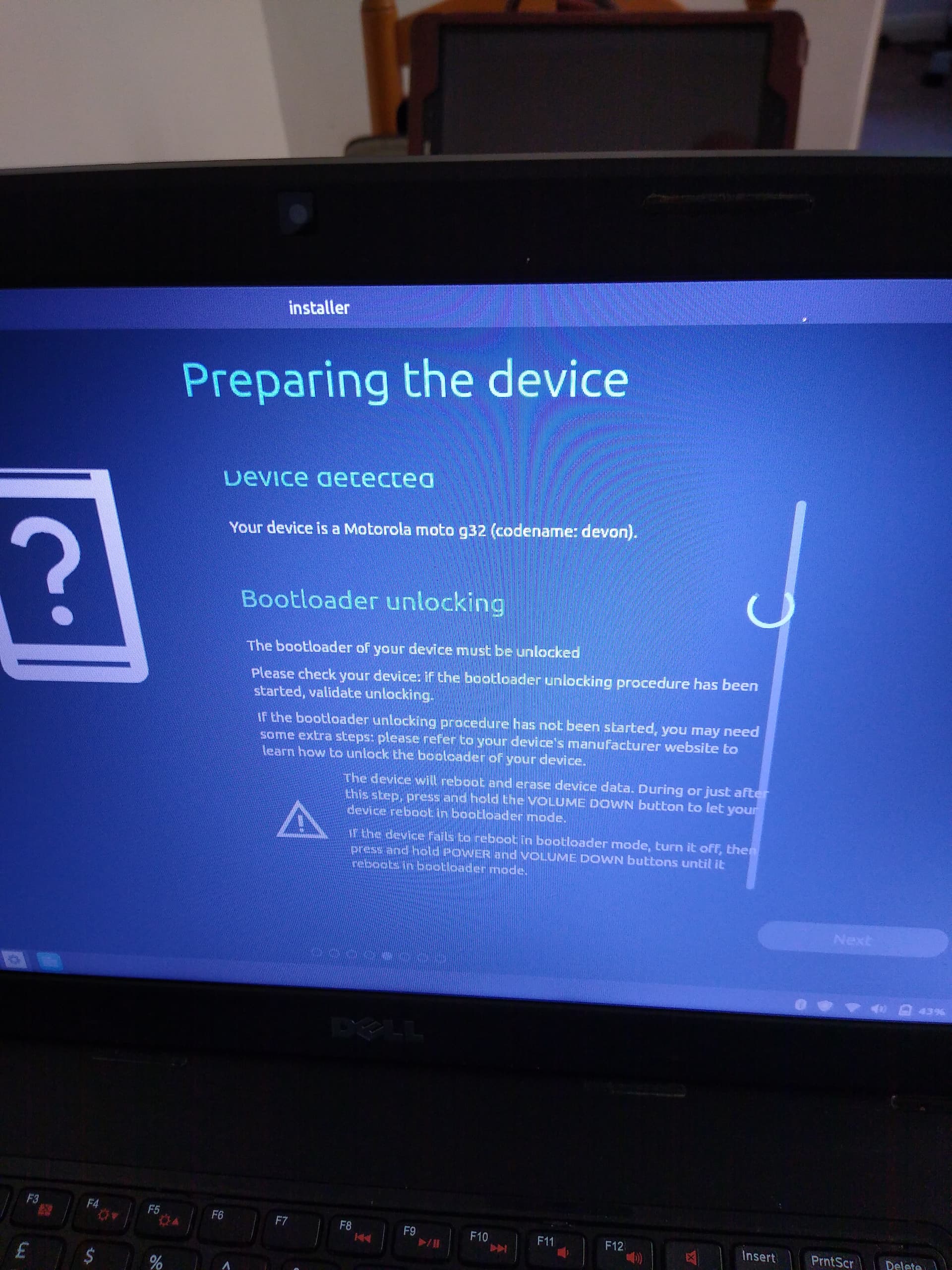
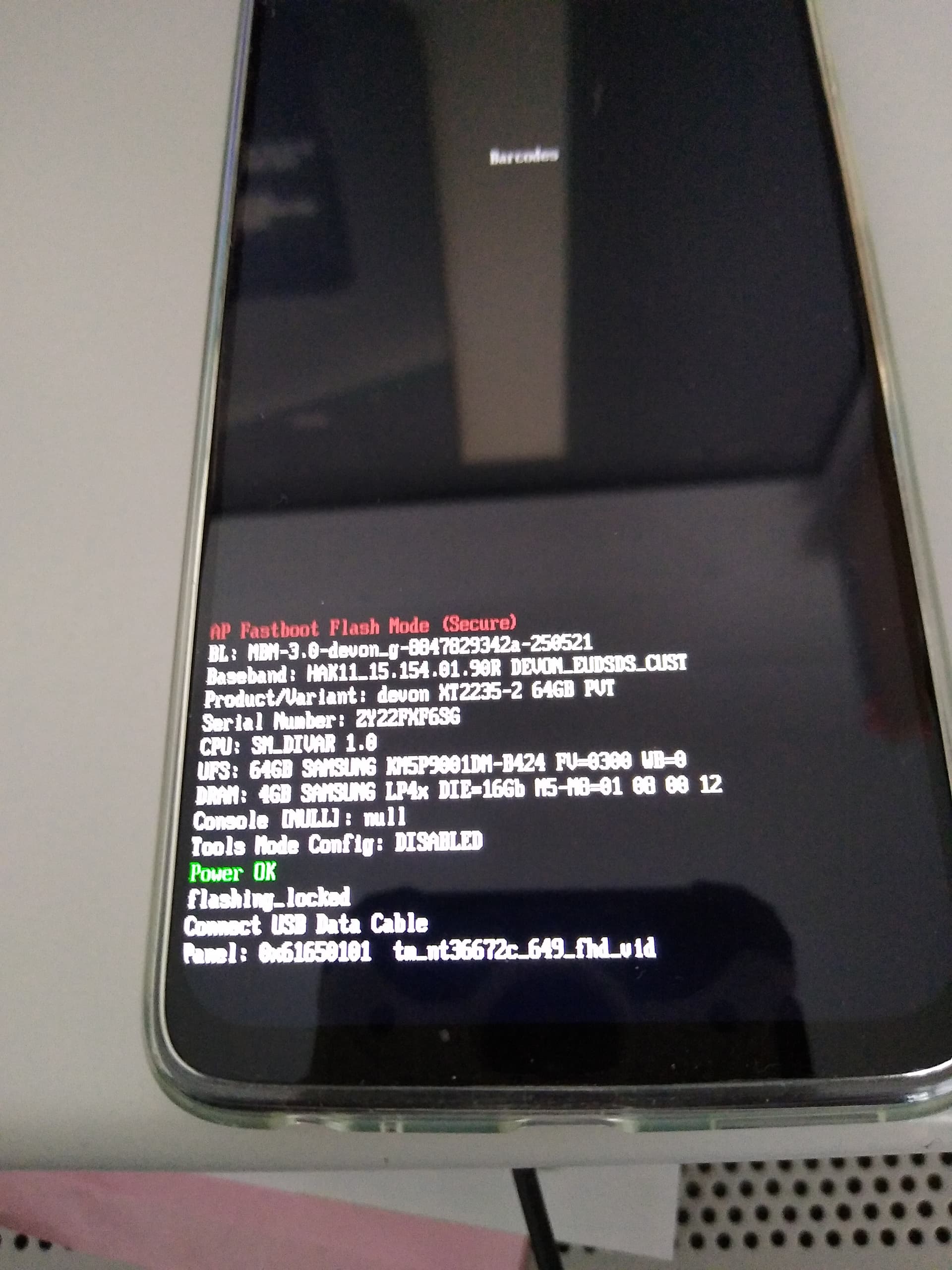
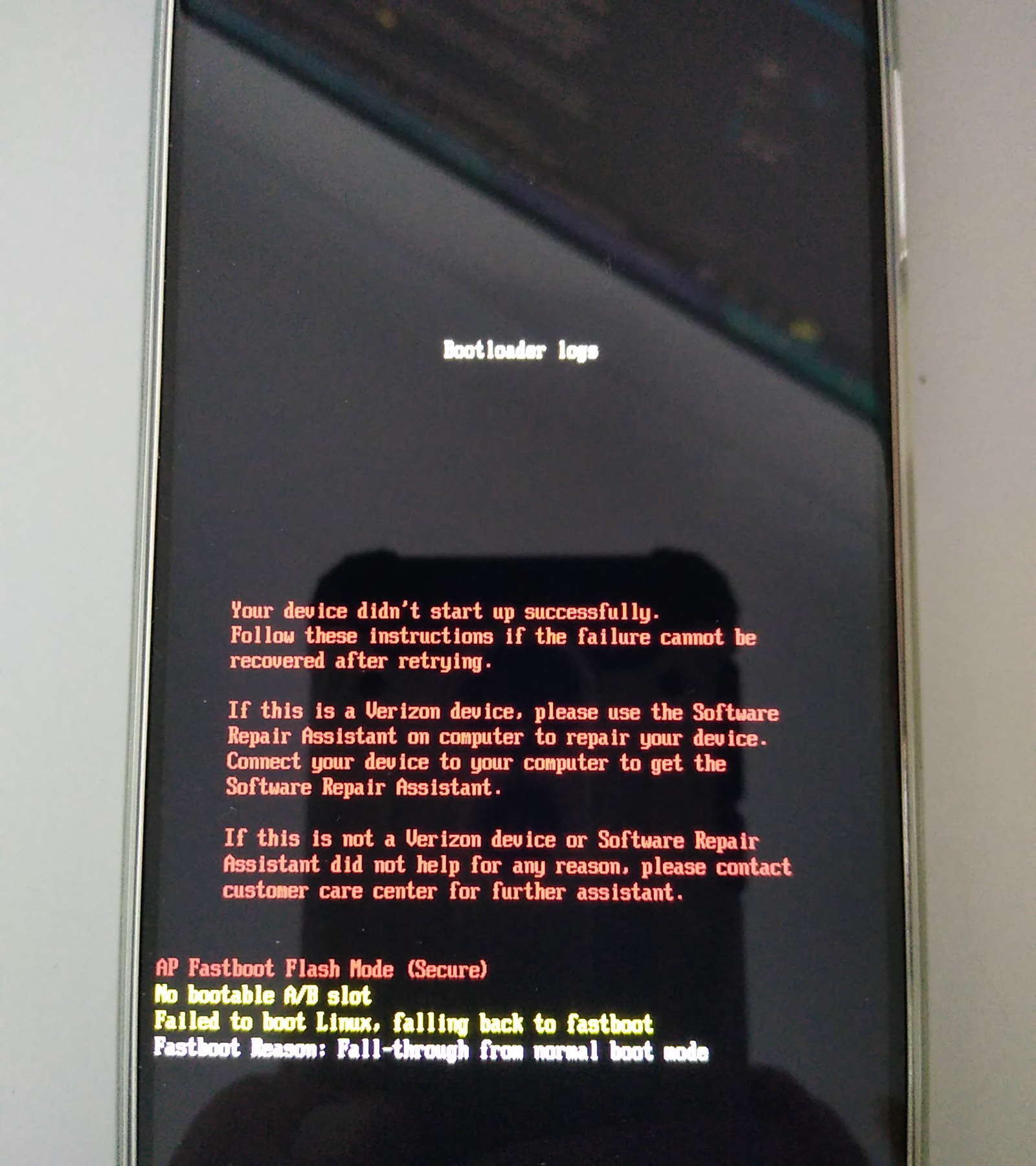
Sorry, forgot to add photos to the message above.
1 Like
Thanks for the details, I’ll try to get some more feedback to see if the devs see anything amiss.
To your question about going back to an unlocked state, you should be able to execute the following command from your bootloader:
fastboot flashing unlock
That will wipe out any existing userdata partition. But am wondering if this at least gets you back to booting iodéOS?
Thanks Rik
Yes that’s the command I used successfully the other day when the phone wouldn’t boot after I tried locking the boodloader. Unfortunately now when I connect the phone to my computer and am in bootloader the computer is not seeing the phone. The “adb devices” command finds no device attached.
doug@doug-aspirem1930:~$ adb devices
List of devices attached

doug@doug-aspirem1930:~$
“lsusb” command does find the device.
I’ve tried on two computers and different cables.
Surely as I’ve just flashed a new operating system on the phone USB debugging won’t be activated?
Wouldn’t this explain why adb commands are not seeing the device?
Anyway, thanks for your help.
From the bootloader / fastboot screen it is correct that adb isn’t active, as you are before the OS is loading.
But fastboot should still be available. Use fastboot devices to see if you have access to the device, then apply the unlock command.
Thanks that makes sense.
Tried as suggested and “fastboot devices” does show the phone is accessible, but the unlock command fails.
doug@doug-aspirem1930:~$ fastboot devices
ZY22FXF6SG      fastboot
doug@doug-aspirem1930:~$ fastboot flashing unlock
                                                   (bootloader) Check 'OEM unlocking' in Android Settings > Developer
(bootloader) Options
FAILED (remote: '')
fastboot: error: Command failed
doug@doug-aspirem1930:~$
Hello from a past CalyxOS community member,
The rollback index issue in the Motorolas is different than the ones in Fairphones for example, it’s not SPL (security patch date) related, or even major Android version.
It’s this specific value, that, instead of being wiped on unlock, sticks around, and so rollback protection always kicks in.
When a custom ROM with relocking doesn’t match the same value as stock, relock will cause the issue that doug reports. This value is usually updated in the device trees, but since Calyx was paused, that value hasn’t been updated by Mike, so new builds don’t solve the issue.
Example of commit updating the rollback index: https://review.lineageos.org/c/LineageOS/android_device_motorola_devon/+/435905
If you see anyone having issues relocking on G42 or G32, it’s this.
Note for any developers, MATCH, DON’T INCREASE, as if you flash a value that’s higher than stock, while the security might be better, the user will not be able to flash stock and if they do, they’ll hit a hard brick.
1 Like
Unfortunately, I’m not sure how it came to this, but if it is complaining about OEM Unlocking and it is in an unbootable state, I’m not sure you can recover from this. You’d have to flash everything properly, but it being in a locked state might block that.
These devices only received A13. It shouldn’t matter, the latest firmware seems to be flashed already.
What did you do between the last time you could unlock and when you couldn’t? Did you try flashing stock or anything like that?
Hi, thanks for your replies.
All I did after the last time I could unlock it was to follow the guide to manually install rather than using the installer that I did originally.
1. Update the stock firmware to the latest
2. Get your unlock code from Motorola website
3. Unlock bootloader: connect to a wifi in order to grey-out “Unlock OEM” in developer settings
4. Activate adb and type adb reboot bootloader, or press Vol- and plug phone while it’s shut down
5. Type fastboot oem unlock 0x<unlock code>
6. Download fastboot package for your device (latest file iode-[...]-fastboot.zip):
-
- package for Edge 40 Pro*
7. Unzip fastboot package and executeflash-all.sh(linux) orflash-all.bat(windows)
- package for Edge 40 Pro*
After that it only boots into bootloader and won’t unlock.
I was thinking of trying to flash stock, do you think that is worth trying?
Can you give some more clarification here? When you use the fastboot command to unlock it gives an error, or isn’t able to be seen by fastboot, or other?