Thank you very much.
This means, you used ADB to unlock the bootloader but used the iodeOS included updater to install the update afterwards. I will try this.
Thank you very much.
This means, you used ADB to unlock the bootloader but used the iodeOS included updater to install the update afterwards. I will try this.
Thank you very much… it worked perfectly.
Note that @vince31fr updated the situation here: Fairphone 4 update to iodéOS 7.4
In short, the method @parity and @beetroot followed by unlocking their device (which reformats userdata) and then installing, then relocking basically follows “option 1” that he describes: “clean installing the system”.
Option 2 is to install the update from Recovery, then when still in recovery, do a factory reset.
But the original guidance at the top of this thread hasn’t worked (to install the update from the “Updater” app, then factory reset afterward), so again this means a user needs access to fastboot via a terminal to either unlock the device or just fully reinstall, or to adb sideload the update from Recovery.
Sorry again for the difficulties, this Fairphone firmware bug has been very difficult to solve (effectively this process to reset / upgrade sidesteps the bug to move forward “past” it).
I have heard that Vincent will be elevating the priority to get the FP4 re-integrated in the graphical installer: this would at least allow a user to re-install without a terminal connection to their device (but it still will not preserve user data so if you are able to reinstall or “upgrade + reset” there is no reason waiting for the installer update will help).
Hi all,
Firstly, big thank you for all your guidance and effort. Special thanks to @rik , @vince31fr , @MissPiggy
Now just sharing my experience with updating:
So far so good then, with the exception of Telegram FOSS (help apprecited). Thank you again!
Last weekend, I took the big step and updated my Fp4 from iodé 6.x to iodé 7.4. The most important data, such as Messenger, email, the address book, and the calendar, were restored. I’ll install the remaining apps step by step.
I hope the update to iodé 8.x will work without having to reinstall! 
Do you not have Telegram running on desktop or another device still that can “approve your new device”?
So I finally got around to upgrading my Fairphone 4 to Iode 7.4 and restoring the 20GB backup…
Let’s see if this resolves my battery issues.
Many thanks to the developers for still trying to get it right…
Battery life times three…
Battery drains 3 times as fast, or your run time is 3 times longer (so battery drains 1/3 as fast)?
Hah, I meant that it now runs three times longer with the same use. Like before the September upgrade.
Can you see why this upgrade was so important for us? 
Unfortunately not. So I temporarily installed official Telegram app, just to validate my account via SMS, then went into web Telegram on computer, recovered my account there via internal message in official app, then uninstalled official app, installed FOSS version (which is now named “Fork”, I learnt in the process), and validated my account again, this time using web Telegram.
I did not expect this journey, but it is done now. I just fail to remember this limitation Telegram puts in FOSS implementations.
Thank you!
Hi Rik, re-reading this stuff after successfully switching from 6.12 to 7.4..
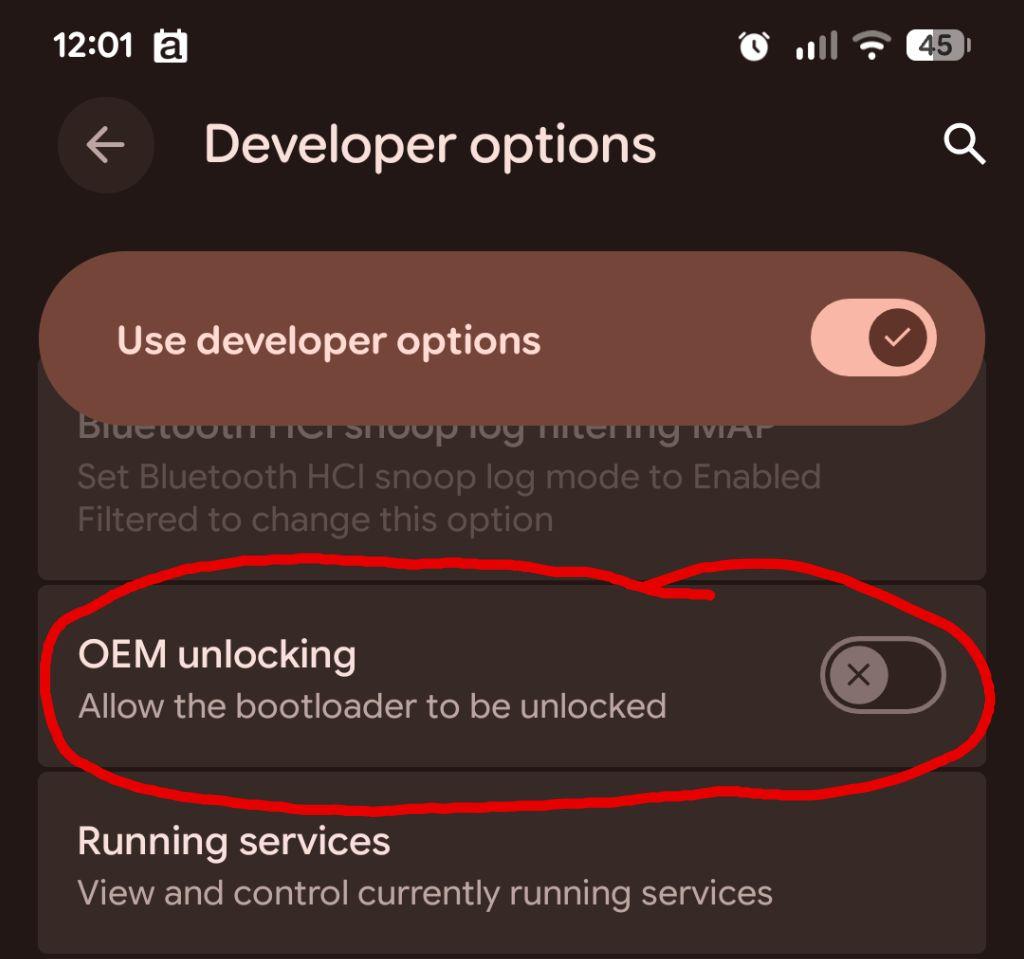
I found this in Developer Options:
So bootloader is locked. I was not asked to lock it. I do not know if or why the procedure is arranged in this way.
Do you know the purpose of locking/unlocking? Pros/cons? How to? And last not least, could unlocking at some point in the installation process be helpful to skip all that hassle of reconfiguring an FP4 in case of future major updates?
Greetz
OEM unlocking ≠ bootloader status
Re your question about the pros/cons, please proceed to this thread.
The key FP4 Firmware Issue requiring the system reset to upgrade now behind you, I don’t forsee another need to do that again (reset because the device has a locked bootloader), but of course nothing is certain: it really was (is!) a nasty unsolved bug from Fairphone’s Firmware.
To add to @MissPiggy 's helpful comments on “OEM unlocking ≠ bootloader status”, to confirm you would need to observe during boot if you get a message it is unlocked or not. Or to be fully certain, you can use fastboot from a terminal to interrogate the status. But if you were unlocked before then you very likely remain unlocked.
I can’t exactly say why the “OEM unlocking” switch is disabled. I think this is manufacturer-dependent. So maybe for Fairphone “if it is unlocked then the slider is disabled” since effectively it is already unlocked. You can re-enable that slider if you like.
It was also the case on my Motorola G32. I just enabled it again after detection. My bootloader remains locked.
I read “Allow bootloader to be unlocked” as though the statement implies that bootloader is currently locked, since why would one ask such allowance if it is already unlocked?
But perhaps, I am reading too much “human” rather than “computer”.
Thanks for the link,
The switch is not disabled, but the allowance is disabled. The switch is not grayed out, i.e. it is available. So it can be switched to “YES, allow the bootloader to be unlocked”.
What is unclear to me: After one gives that permission, how then, by which action is the bootloader actually unlocked? Giving permission to unlock ≠ unlocking.
(It appears to be locked indeed)
Typically you can see from the bootloader / fastboot screen if the device is locked or not. An unlocked Pixel, for example will show this in the case it is locked but the slider is enabled to unlock it: “Device state: locked (unlockable)”
To actually unlock or lock, fastboot is used. The syntax can differ depending on manufacturer.
fastboot flashing unlockfastboot oem get_unlock_datafastboot oem unlock <code>Disclaimer: unlocking or locking will reset / completed wipe your user data
I confirm.
With 6.14 my FP4 could hardly survive my night.
Unless put in Airplane mode. Then it would loose only a few percent of load.
With 7.4 , ordinary mode, it looses 10% of load.
Okay. Nice.
At the same time, this raises the question what this phone is doing while I am asleep!
OTA Update to 7.5 failed tonight and sent me to a “corrupt user0” bootloop.
I do understand, after reading this thread, that this results from a FP bug, but I seriously wonder why Iode pushed this OTA update, apparently without testing (or at last a visible warning)?