Hello, fine people I’m on a FP5, had it since launch, was on Calyx before (which worked perfectly) but changed to Iode recently. I’ve done the n00b thing and did not check if calling works (I did but only if it rings +___+) and now it turns out it doesn’t.
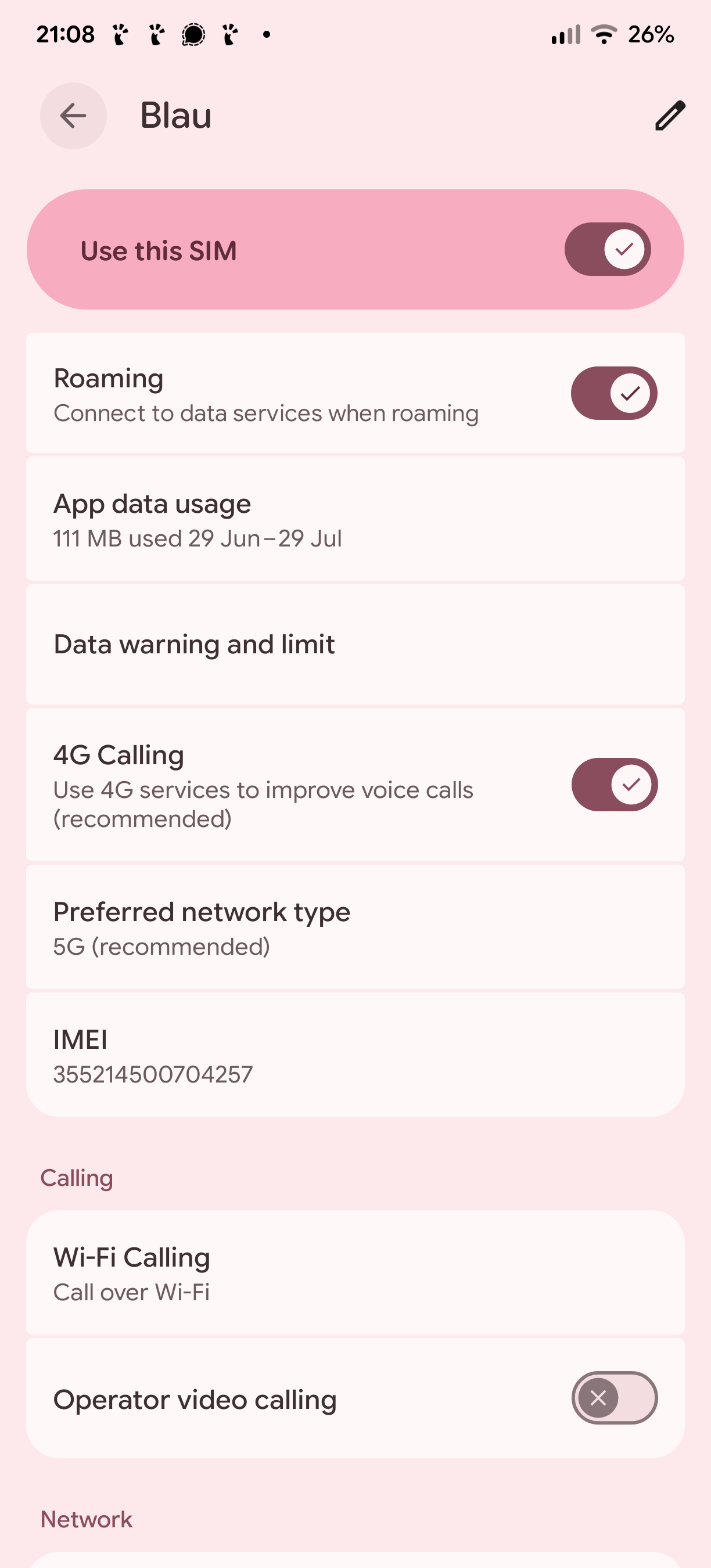
I have a physical German SIM card (Blau) and and an UK eSIM from Three. I’m concentrating on Blau since I’m in Germany atm (could do tests with the UK SIM as well, it’s disabled atm)
There are multiple weird things going on:
Calls hang up automatically after 10 seconds (most of the time)
The mobile receiver can’t hear me but sometimes I can hear them (the latter might only be on Signal? This is sooo strange. If it was only mobile calling but how is it affecting Signal as well?).
I can make voice recordings and play them back, so microphone / speakers work.
I had a look in the forums and messed about with ACP / Access Points Names a bit (changed from IPv4&6 to only 4) and rebootet but no luck.
*#*#4636#*#* says:
IMS: Registered
LTE: Unavailable (is this 3G or does this include 4/5g?)
Voice Wi-Fi: Available (this is new said unavailable earlier)
Voice Calling: Unavailable (+___+)
UT: Available
I would be very grateful if someone could point me to things I could try, would be happy to test more things / give more information.
Uhhhhh, it looks like I did not relock my bootloader after installing. This might be a problem, right? And all data is gonna be wiped when I relock, right?
Yes, the data partition will be wiped when locking the bootloader. But I do not think that this is the reason for your problems.
LTE is not 3G (that was UMTS). But it is also not exactly 4G. When you are speaking of audio calls, you will want to look into VoLTE/VoWIFI.
Have you contacted Blau? There is some stuff they can do on their end.
You already checked at settings → network & internet → mobile network → SIMs if VoLTE/calls via LTE is active?
Interesting, I had not thought about contacting Blau, that’s a good idea (if it’s actually possible, might turn out to be another Help Desk Hell).
Unfortunetely, I’m not sure I can follow you with checking for VoLTE / VoWIFI
Settings > Network & Internet doesn’t have Mobile Network in my case, there’s SIMs and then my mobile network Blau (and the deactivated 3UK) where I have Wi-Fi calling active (interesting „Operator video calling“ – whatever that is – disables 4G Calling). Searching LTE just returns the general Internet and SIMs pages for me where I can find nothing of the sort …
Your *#*#4636#*#* is the most definitive place to look, so you definitely are in the right place!
Since it shows “LTE Unavailable” but “Voice Wi-Fi Available” then you are registered with VoWifi but not currently VoLTE. This may be expected as it then routes over wifi first only using mobile if wifi is down, and should work if your carrier account settings have VoWifi enabled (in the USA this requires you give an address to the carrier so that in the case you make a VoWifi emergency call they know where to find you).
But to be more clear on VoLTE if it is working or not, can you either disable VoWifi (from your Blau SIM Settings > Wifi Calling), or instead just turn off your wifi (so only on the cellular network) and then re-check the *#*#4636#*#* info? Maybe VoLTE will activate then and calls will work, meaning a possible wifi config issue is at fault for the problems? But if it still shows “LTE: Unavailable” then you would need to contact your carrier to have them look at your account and see if there is anything not correct on their side.
FYI, I always consider VoLTE to be “4G / 5G calling” by the way, it is not 3G at all. VoLTE relies on the IMS connection that registers on the 4G / LTE (also interchangeable) network, and after that is established, it then can activate VoLTE.
Oh, interesting, I’ll check that out, from my first test just now, it looked like it indeed says LTE calling available when I disable Wifi calling. Unfortunately in both cases I can’t hear anything when I make a call (Wifi enabled / disabled).
Are you sure this means that the problem is with Blau, then? Because it has been working fine on CalyxOS until a few weeks ago and while it’s possible that they changed something on their end I think it would be a weird coincidence (I have written them a few days ago but have not heard back yet – and I’m not holding my breath).
I just put my brother’s SIM card into my phone who is with another provider (Aldi) and it didn’t work either (though it did say „MedionMobile“ as carrier with his SIM card which is one of my APN options with my SIM, so maybe Blau and Aldi are both resellers of the same network?). Interestingly, it now says VoLTE is available in IMS when Wifi is enabled (and WifiCalls aren’t). It all seems like rocket science / magic (= complicated).
Oh, interesting, I had not seen that, thanks a lot! My protocol was on Ipv4 only already, added the cbs to the ims ap and rebootet but no luck (VoLTE says unavailable now, which I think it didn’t before) but I still can make calls but don’t here anything …
There have been some cases of people coming direct from other ROMs besides stock having unexpected hardware issues. LineageOS documentation always says only coming from stock is supported. We aren’t that extreme, but sometimes flashing stock then flashing iodéOS has been a solution that has helped in some cases?
But since it isn’t a microphone issue per se then I also don’t know if this is worth the hassle of testing. It really does seem like a possible carrier issue. If you have VoLTE available (with wifi calling disabled) but voice isn’t coming through and it is auto-disconnecting after 10 seconds it is worth explaining that.
I had one issue with a test device where voice calls were not working, and my carrier solved it with this reply: “Your line just needed a quick backend provisioning and a reconnect to Verizon’s towers, which I took care of for you.” This was using US Mobile with a Verizon network SIM. The SIM worked fine in other phones, but only was not working on the OnePlus Nord N20 I was testing (same iodéOS version). So it was strange, but regardless it all worked after that.
To add to my above, I did not use APN > Type > ims, cbs; I used ims,ia the ia stands for Initial Attach, an essential part of LTE connection (your search engine will tell you more than you want to know).
I also saw in another thread here or on Brax forum, a T-Mobile user had to change his APN > Protocol > IPv6 not IPv4/IPv6
Ooops, yeah, I completely forgot going to stock rom before switichgin to another custom ROM, I should definetly do that if I ever switch again.
Interesting, that it could be solved on the carrier side from you’re example. I’ve got a reply from my carrier Blau/O2 which is an example of how not to do it if you don’t want to seem like a random spam mail: No mention of my initial question, just wants my details, coming from a super weird (but apparantly official mailbox ( impressum@cc.o2online.de ) plus lots of filler text doesn’t mean anything. Got all my spam-senses tingling but I guess it’s real …
 I’m on a FP5, had it since launch, was on Calyx before (which worked perfectly) but changed to Iode recently. I’ve done the n00b thing and did not check if calling works (I did but only if it rings +___+) and now it turns out it doesn’t.