Device
-
Fairphone 5
-
iodéOS 7.5
SIM / Carrier
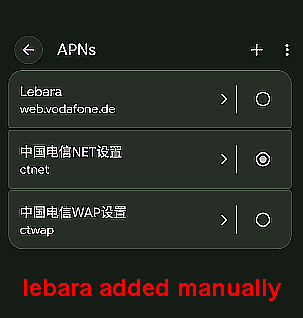
The issue occurs (reproducible) while roaming in the Netherlands on Vodafone NL, with a Lebara Germany (physical SIM). During roaming/network re-registration, the APN is remapped to the read-only China Telecom ctnet entry.
Problem description
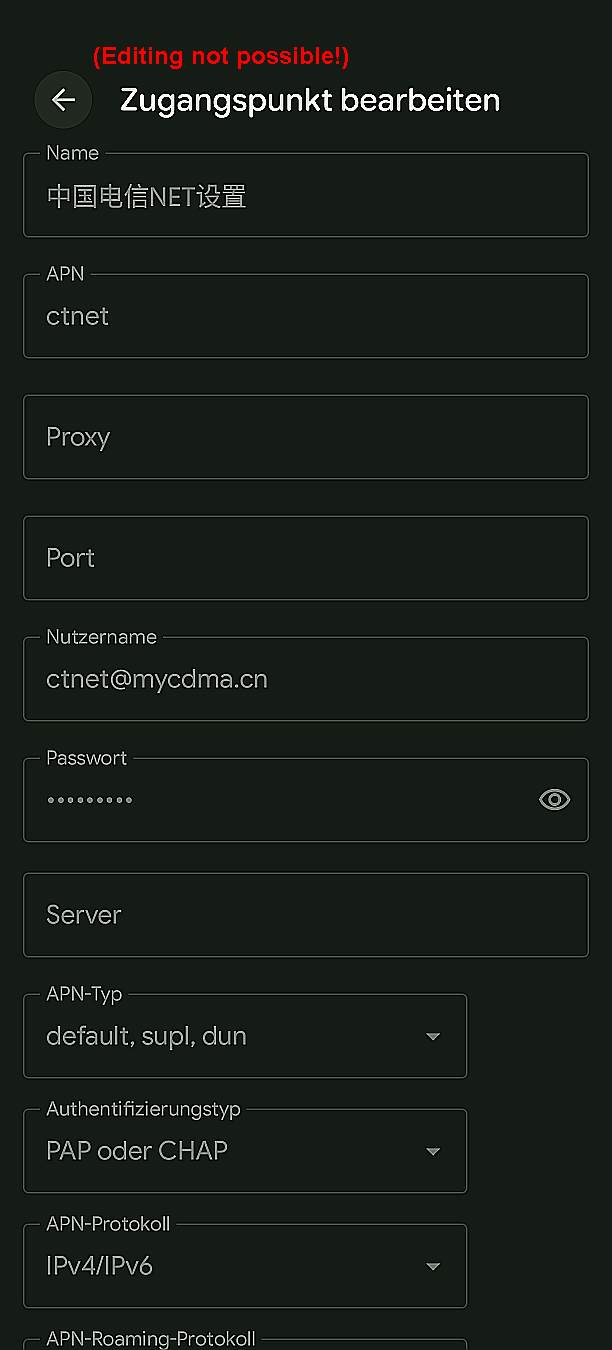
The device repeatedly switches the active APN back to a read-only APN entry with the following values:
-
APN:
ctnet -
Username:
ctnet@mycdma.cn
This appears to be a China Telecom APN. When this APN becomes active, mobile data stops working. The issue is especially reproducible while roaming in the Netherlands on Vodafone NL.
During roaming/network re-registration, the APN is remapped to the read-only China Telecom ctnet entry.
Important observations
-
The
ctnetAPN entry is greyed out / read-only. -
I cannot modify or delete it.
-
A manually created APN works correctly.
-
However, after certain events, the device switches back to the
ctnetAPN automatically.
Triggers
The APN reset most commonly happens:
-
after leaving Wi-Fi
-
after network re-registration
-
after crossing country borders / roaming events
-
sometimes after reconnecting to mobile data
Expected behavior
The manually selected APN should remain active and the system should not automatically switch to an unrelated China Telecom APN.
Actual behavior
iodéOS appears to remap the carrier/APN configuration during network re-registration and activates the read-only ctnet APN again.
Additional notes
This looks like a carrier configuration / APN database mapping issue affecting Lebara Germany MVNO detection.
It may originate from:
-
CarrierConfig
-
APN database mapping
-
MVNO matching logic
-
inherited LineageOS telephony configuration
The issue is reproducible.