I have the same problem with my Pixel 8 , Developer options does not open also Aurora store and F-droid store won’t download or install apps, Install unknown apps is allowed. tried
System Settings > Apps > Special app access > Modify system settings > “3 dots” > Show system > Secure UI Service > Toggle “Allow modifying system settings” Secure UI Service option is not there.
Have tried reinstall Android , but as Developer option doesn’t can’t change USB debugging or OEM unlock.
strange cuz I installed iode on my pixel 5 for trial before a pixel 8 install
Have tried , with no luck, factory reset with delete, reset apps
I think that when others have had this problem it is because they did not go back to stock Android before flashing iodé. Lineage (and thus iodé) assumes the underlying base is stock Android 15. Here is the relevant bit:
Installation on your device requires a specific firmware version to be installed before you continue.
…
LineageOS builds for this device require an Android 15 version of the stock OS to be installed prior to following the installation guide
…
Being on another custom ROM, including unofficial builds of the same version of LineageOS, does not ensure that this requirement has been fulfilled
Please re-read this section as many times as necessary to fully understand the requirements
Note that you can flash back to stock easily with flash.android.com (using a Chromium based browser ) but do not need to activate network after install. Then you can proceed to flash iodé (you do not need to flash Lineage, I only linked to that as the pre-install requirements are the same).
And cannot return to stock get connection error, as Developer options will not open to change USB debugging and OEM unlocking, what is your recommendation?
Also found this solution, but “System UI” is not listed
Go to Settings >Apps and notifications>Special app access>Modify system settings>Tap “Show system” from the three-dot menu>Select “System UI”>Toggle “Allow modifying system settings” off and then on.
I think its bricked, bootloader state is locked (unlockable)
P.S. In my opinion, enabling “USB debugging” is an unnecessary step, as the flasher anyway puts the phone into fastboot mode to flash it. Therefore, you can skip this step and boot the phone directly into Fastboot mode.
Performed the recovery as described using http://flash.android.com/
With phone in fastboot, using flash allows selection of the pixel8 and is connected but the firmware selection is empty and so cannot select stock option
And instructions in Reset your Pixel phone manually with Fastboot mode - Pixel Phone Help.
All that happens it restarts the iode installation but still have the same problems
I’d already tried these earlier and I still get the same result.
Developer options does not open clicking it crashes and takes me back settings list and in system no developers option.
Aurora store and F-droid store won’t download/ install chosen apps!
Do you mean the flash.android.com firmware selection is empty, or that all completed successfully (using an A15 build there, not newest A16 builds), and now in the iodé installer it doesn’t allow selecting the firmware?
and now in the iodé installer it doesn’t allow selecting the firmware? Tried reinstalling iode but hampered as I cannot set usb debugging oem unlocking.
How do I install iode whilst the phone is in fastboot? is that possible, yes found this, have downloaded iode 6.6 sha
Unlock OEM in developer settings, Not posssible
Activate adb and type adb reboot bootloader, or press Power + Vol-how do i intall adb on windows
Type fastboot flashing unlock
Download fastboot package for your device (latest file iode-[...]-fastboot.zip) Done
https://pixelrepair.withgoogle.com/ only works for EE, O2, Three or Vodafone network supplied devices, can chose Others but says to use Android Flash Tool but that requires Developer option to unlock OEM and USB debugging, which Ive tried.
Ill try in fastboot, recovery and rescue, once I get past no command.
Fingers cross recovery is proceeding, installing 250905 which is A16 I believe
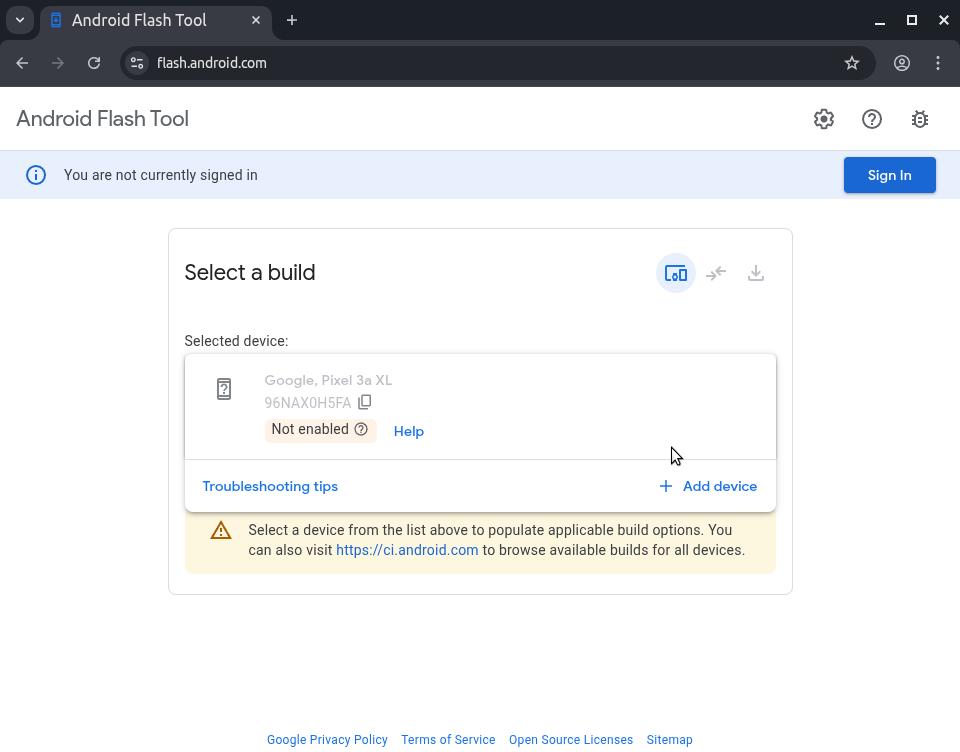
Even without Developer mode working, it may be that ADB access is already enabled. So when you go to flash.android.com (using a Chrom(ium)) browser, it should pop up to “Grant access to ADB keys”, then you click “Allow”, then does it show your device? After that does it say “Not enabled” (that would confirm ADB is not enabled)?
I disabled ADB debugging on a test phone (Pixel 3a XL), this is what I then see (is it the same for you?):
Please see my last response to VelesG , android repair was asuccess, thank you both for your help and support. Now on Andriod 16 so that means I cannot install iode os or any other third os I suppose
You didn’t have a chance to change to A15 Yes. I didn’t, maybe when iode is based on A16 I’ll have a go. After A15 250505 update you cant go before this.
My is to use Island to create a work profile and install Google , assistant, lens, camera, calender, android auto etc apps in there, and in personal replace phone, contacts, calendar, calculator etc with open source alternatives and disable their Google equivalents. It’ll not be a full degoogled but close enough for my low threat level. I have 3 gmail accounts 1x I’ll use for work apps, 2x with no personal data, all settings turned off 1x for personal and 1x for private space (financial apps). I have 4th a Tutamail for personal.
Here is a guide (with several caveats and warnings) on how to go back to Android 15. In short you can do it, but you need to download the full image and make sure to fash it to both slots etc. I didn’t read farther than this as I am not in this situation, but I think it should work if you are willing:
 ) but do not need to activate network after install. Then you can proceed to flash iodé (you do not need to flash Lineage, I only linked to that as the pre-install requirements are the same).