I have been an iodé premium customer for a few weeks now and loving the system. Al a premium customer, I have set all my apps to ‘reinforced’ blocking and have reinforced as the standard.
One of the homescreens on my phone has the iodé widget running, which shows me the last connections by apps, but also shows me a bar at the top between “Malicious recipients blocked” (in blue) and “Malicious recipients not blocked” (in orange). The title at the top clearly tells me “Efficiency of the blocker today”. (my emphasis).
Right now, for example, it tells me that 18 recipients were blocked, and 7 were not.
If I open the app version and ensure the selector is set on “today” then it tells me that “18 malicious recipients blocked”; 18, of course, matches the exact number the widget told me.
But… there is absolutely no mention in the app version of the 7 that were not blocked, the ones in orange.
If I look through the various options of the app I see all the blocked connections and I see the non-blocked connections, but nothing that tells me a malicious connection was made and not blocked.
Perhaps I’m not using this app correctly, but can anyone please advise me why the widget might be alerting me to 7 malicious recipients not being blocked, but in the app I cannot find any reference to those malicious recipients, who they might be, or do anything about them.
For the record I have been having the exact same issues. I open iodé app from the main profile, the work profile (within Shelter) and the version in the private space and all show everything blue, and only differ with the MRB Number in the centre of the screen. I see everything as described above, including the desktop widget, as showing numerous unblocked ones in orange (e.g. 20+ for me) and PLUS however tapping the widget fails to load the iodé app too, it opens but comes up blank of data and says something about the blocking may be causing the issue present. But iodé opens fine from the app shortcuts in all 3 profiles listed…?
Also at the same time I also identified several apps I have used multiple times, and that connect to the internet, and which do not appear anywhere in the iodé apps list of apps (in any of the 3 profiles) - so you can’t reinforce them or see where they are connecting.
I have tried the suggestion above about resetting data earlier today will be monitoring for a week or so to see if that resolves it or it reoccurs. But I just wanted to post the additional symptoms I had in this thread for anyone else in future who is searching for these types of issues here.
I am not sure if it will resolve all the issues you described, but there are recent fixes to the iodé app regarding the persistent notification crashing, etc. For me, I haven’t added the iodé app to Shelter which I see as an issue, I’ll try to add it there and cross-check to confirm the issues you report (using the updated app, I am on the “beta” channel so I think it will be brought in without manual install).
Thanks @rik - FWIW I’m continuing to see inconsistencies and such. Effectively I have 4 instances of iodé app, original in main profile, one I cloned into Shelter for work profile (after a while as all WP apps weren’t showing in main iodé app), the one the system cloned into Private Space, and the homepage applet on the main profile. All report different things, show a different selection of apps, and between them I believe don’t show a couple of apps I use that connect to the internet. The applet is always really bad and seems highly inaccurate or even is unusable with the message about blocking breaking things, despite having all blocking turned off on iodé app itself.
I’m not confident enough to know for sure if its a system / OS thing or something I am doing. I am going back to reread all the iodé app documentation on how it works, as soon as I have the time, to recheck I’m not doing something wrong…
Yes - I only did it as a test as I didn’t believe I was seeing all connections. I still dont think I am… So it hasn’t helped and I’ll uninstall the cloned instance…
Still a bit mystified…
EDIT: Just checked and can’t be uninstalled from Shelter work profile (once in there) apparently… Pretty sure I did clone it there originally…?
You can’t uninstall an app installed in the “Shelter / Work Profile”?
About the iodé app, it is a userspace frontend for iode blocker which is effectively running using iptables at the underlying Linux level:
But as the app is running in userspace, this is why it may not be seeing and reporting on apps in Shelter / Private space. I wonder if blocking is happening for them (from the blocker), but not clearly reported on (in the app).
Let me try to get some better clarification on this, as you can tell I am a bit uncertain too
That would be great @rik - thanks. Meanwhile I will post a couple of screen shots just to better illustrate for clarity the differences and identify some specifics around apps I don’t believe are showing in any instance…
Here are a few explanations on the behavior of the blocker with multiple profiles/users. Some choices are debattable and may be modified/improved. Here are the two main points:
The blocker in a given profile (work profile, private space, secondary user…) only sees applications installed in the same profile.
Blocker’s settings and statistics, for a given app, are common to all its instances. New connections for an app in the main profile for instance, will be seen in the blocker for another instance of the same app in the other profiles. Similarly, the recipient customizations you do on an app in any profile will apply to the same app in all other profiles. Statistics of an app erased in one profile (long-press on that app in report tab), will be erased in all profiles. And so on…
To be honest, we have not paid enough attention to the blocker’s usage with multiple profiles/users yet, and I think this must be reworked a bit. Some features are actually common to all profiles, like the ones above, while some others are not, like account registration or blocker password. This should be uniformed ; either we consider that the whole blocker and its settings are common to all profiles, or we consider that each blocker instance is independent of the other. Both make sense in my opinion, but the choices at the present time are not that clear.
About the other point, the widget.
Tapping on it should indeed open the blocker app, and I never encountered the bug you mention. We would need more information, maybe a screenshot of what you describe (“it opens but comes up blank of data and says something about the blocking may be causing the issue present”).
The discrepancy between the statistics it presents and the ones in the blocker also have an explanation, and that’s another point we have to improve. The blocker itself (not its GUI), is a low-level system process that has no knowledge of what is a system app and what is a user app. It blocks connections and collects statistics for all system UIDs, by default with the standard blocking list. The GUI has that knowledge, and presents statistics only for user apps and some system apps. Furthermore, actually, we can have control in the GUI (for changing blocking settings for example) only on user apps. However, computations in the blocker UI are costly, and in order to optimize the widget, it only communicates with the system blocker. Statistics are collected very fast and the widget does not consume a lot of resources. The drawback being that it presents statistics for all apps, including all system apps (event those not displayed in the UI), whose blocking list is the standard one: so there may be some ‘orange’ statistics…
Giving control on system apps in the GUI is in our todo list, which will eventually remove the observed discrepancy.
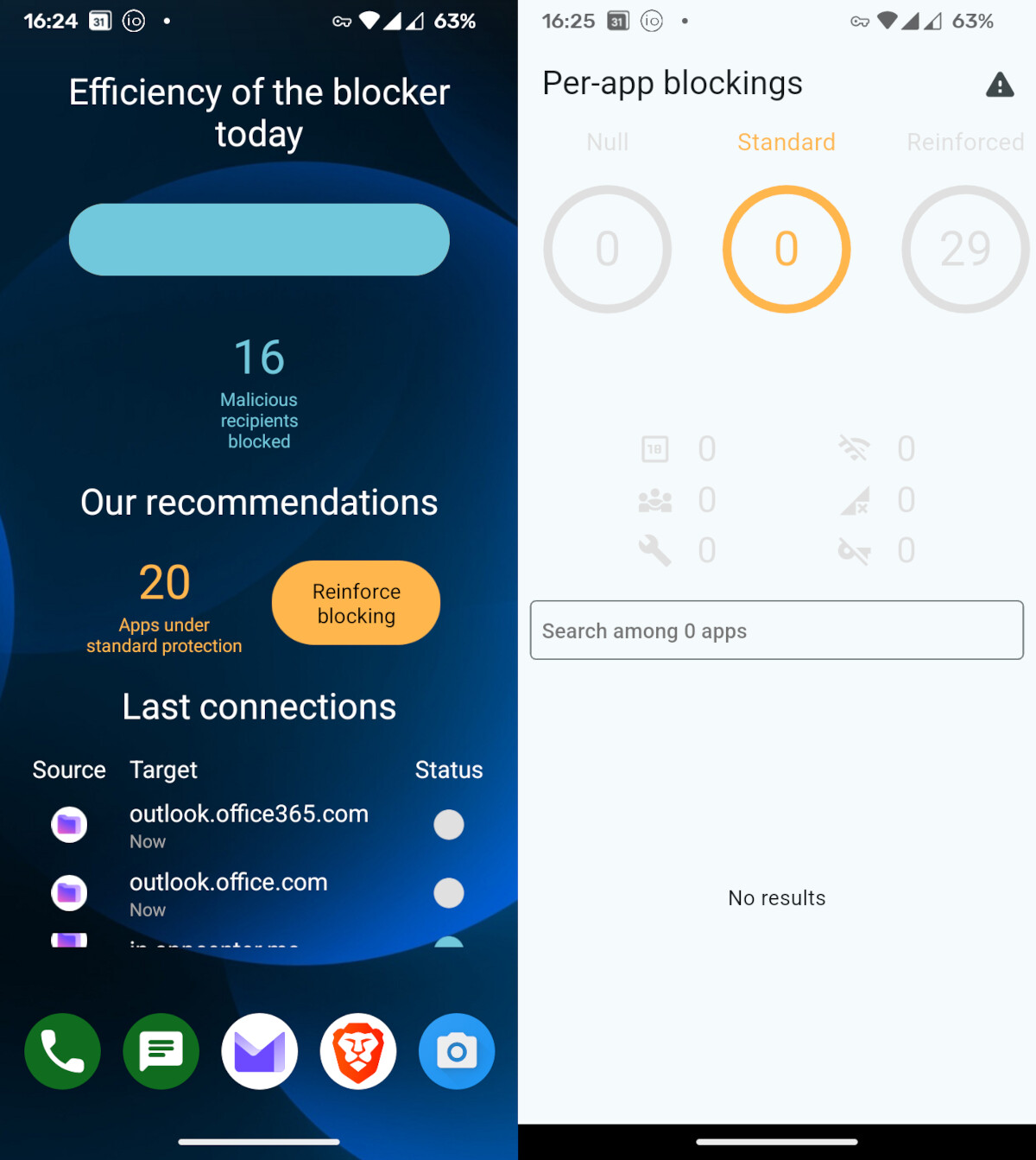
Here’s typically what I get on my desktop applet/widget and when i click into it (i.e. on the reinforce blocking orange button). Note (1) at time of this screenshot I had all instances of iodé app ‘reinforced’, along with every other app showing in every instance of iodé, (2) Private Space is unlocked IIRC (that is where I have Microsoft Outlook & Teams reside - not Work Profile) so is why those outlook links are showing active at the bottom, and (3) the warning icon is present at top right - which has the message about reinforced or normal blocking may be preventing this app and other apps working correctly.
Changing iodé app to Standard or Zero blocking seems to have no effect at all on what happens when you click on the applet EXCEPT it will show 1-2 apps as not reinforced (i.e. these will be itself if I have changed it back to standard). But I have just retried now and it did show some difference from previous, perhaps due to 6.8 update change, so I will do new screenshots today to re-illustrate this and possible different scenarios).
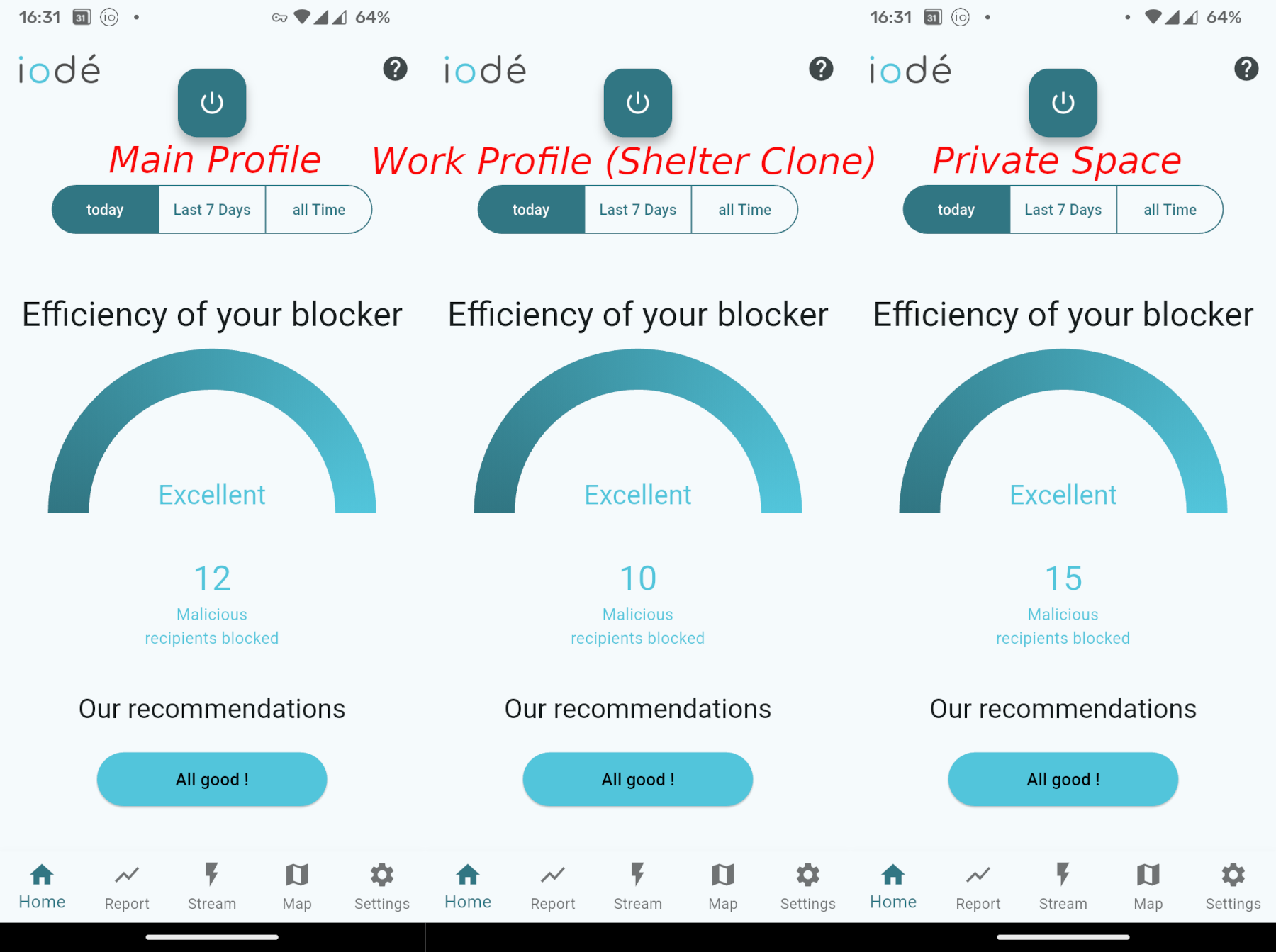
Meanwhile if you open the actual app (in my case 3 separate instances) this is what you see:
As you can see this immediately shows no apps need reinforcing anywhere, yet the applet claims 20 in previous screen shot?
There is a 7 minute gap between the top image and bottom one but nothing changed - I didn’t change any settings nor go into iodé app anywhere. The screen shots of the 3 app instances in the second image were all taken in succession (left to right) over period of 33 seconds.
There different MRB numbers are largely irrelevant (as in Work Profile I had most apps frozen by Shelter except system ones) and in Private Space the apps were obviously unfrozen when I opened it to access iodé (see Microsoft processes comment above). But I would have expected the cloned Shelter app in Work Profile to have had a higher number than the main profile if it should have aggregated both?
Will send some additional screen shots later.
P.S. Note these screen shots are from 1 October, so pre-update of OS to v6.8.
P.P.S. @vince31fr & @rik - I note this thread is marked as solved, on post #2. Should that be updated/removed, or should everything from post #4 (my initial comment) possibly be pared off into a new thread? Does it impact how people may see the thread? Potentially my bad for responding to the solved thread and reigniting the conversation rather than starting a new one - but was looking to be efficient at the time.