Just to confirm, if I unlock the bootloader, install this v7.3 from the beta repository, relock and then restore my Android from a backup, it should work as well?
Will I be able to upgrade to later versions of iodé?
And since I will have to restore, I may just install /e / OS as well. This seems to be more supported by Fairphone as they are now also selling Fairphone 6 with /e / OS preinstalled?
As a minor point of clarification, /e/ only ships an Android 15 base for the FP6. I am not certain of any other custom ROMs besides iodéOS supporting an Android 16 base as with iodéOS 7.x which I think is why we see more than our fair share of the teething issues.
To your specific case, as I understand, a factory reset is what will be required if you in place upgrade from 6.x to 7.x for your FP4, but after a factory reset you can keep it locked. As unlocking or re-locking also triggers a factory reset, you could save some steps and just get your userdata backed up (and your backup of your backup  ), then do either an upgrade with the bootloader locked (then it will not boot but you go to Recovery and factory reset it), or instead do a clean reinstall.
I thought it was working in that case to have it locked, again as I understand it is the upgrade while locked that will fail to boot?
Regardless, before doing any of that make sure that Allow OEM Unlocking is enabled in Developer Options. Then if you can’t boot, you can always re-install (not locking if that didn’t succeed even with a factory reset).
Note that I have heard a fairly credible rumor the developers are working on FP issues over the weekend. We may get get news from them if you want to wait until next week.
2 Likes
Thanks, that’s indeed what I figured.
/e/ is indeed on Android 15, but my FP is now also on A15 but with battery issues 
Let’s wait until next week and hopefully get some good news!
Btw, I don’t want to sound ungrateful for the work that’s done by the developers. I’m a developer myself so I know how difficult it can be…
Another round of testing still has not solved the v6.x to v7.x upgrade on the FP4 if the bootloader is locked. I have been told that possibly another firmware update by Fairphone may possibly solve the issue, but otherwise we don’t have much else to try.
I did update our issue tracking the problem, but maybe it is best I post the content of that here:
Currently
v7.xbuilds are not released to stable due to users upgrading fromv6.xbeing left with an unbootable device if the bootloader is locked.A user can manually upgrade to
v7.x betaif they do a factory reset or if the device is not locked by using the FP4 beta build with the nameiode-7.x-YYYYMMDD-FP4-ota-bricks-device-when-upgrade-from-v6-bootloader-relocked.zipfrom the iodéOS beta repository.If a user with a locked bootloader fails to factory reset before applying the update and it is then left unbootable, they can either go to
Recoveryand perform the factory reset, or instead attempt to boot “about 6-7 times without success, after which the system will revert to thev6.xbuild and should boot thanks to the a/b partition scheme.” After booting back tov6.x, they can save all their data, perform a factory reset, and once again attempt to manually update to thev7.xbeta build.As a further clarification, there should be no problem with having a locked bootloader with
v7.x, it is just that if it was locked withv6.xthen a factory reset it needed to move tov7.x.At this point we can see if a possible future firmware update by Fairphone will resolve the issue, but otherwise we don’t know of other ways forward.
If others find any LineageOS-based builds that can migrate from an Android 15 base to an Android 16 base when the bootloader is locked without performing a factory reset, please let us know.
2 Likes
I have a Fairphone 4 with CalyxOS, which is based on Android 15.
How can I install IodeOS v7 on it?
I have to do a factory reset anyways, so this is not an issue. I am a bit confused after reading this thread and not sure how it’s done right without bricking the phone.
The TL:DR is that it is now not possible to hard brick your Fairphone as far as we know, so take that as some encouragement.
But as the “beta only” v7.x version is all that is publicly available, and that isn’t the “full fastboot package” for a new install, the way is to install v6.x using the manual process ota / ota · GitLab (but don’t re-lock the bootloader at this time), then upgrade to v7.x using the beta download linked above, and then after that re-lock the bootloader using fastboot flashing lock.
Note that this still is “alpha only”, as it is possible an eventual v7 proper fix will come that could require another factory reset. So it is only for an enthusiast willing to re-install.
1 Like
Is there a timeline for when iodé 7.x (stable) will be available for the Fairphone 4?
LineageOS 23.2 (Android 16) is already available for the FP4.
No timeline until we determine if we will bite the bullet and require all existing v6.x users with locked bootloaders to perform a factory reset in order to upgrade to v7.x.
1 Like
Got it. Thank you very much. 
This file doesn’t seem to be in the repository right now. Anywhere else we can find it? Thanks!
It’s there now again in the new round of betas.
If I download the FP4-ota.zip file and follow LineageOS’s procedure (Upgrade LineageOS on FP4 | LineageOS Wiki) to flash via adb sideload (with the bootloader locked), do I still need to perform a factory reset?
Yes, as I understand any method of upgrade from v6.x to v7.x with a locked bootloader will require a factory reset. Sorry.
Vincent posted upgrade instructions in the “iodé News” app and a brief explanation (just noting it is a problem with the Fairphone firmware). I asked him to clarify the post to explain that the data reset will only affect users with a locked bootloader (but I think we will advice everyone to backup their data first regardless since some or ?many? may not even know if their bootloader is locked or not).
2 Likes
I’ll back it up anyway.
But that means I can open the bootloader and then follow the instructions. If everything goes smoothly, all I have to do is close the bootloader again.
By Android design, unlocking (and relocking) the bootloader will trigger a factory reset, and all personal data will be erased. So yes you can do it this way, but the end result is the same: you will need to manually restore your data afterward.
2 Likes
My FP4 Bootloader is unlocked. So for my understanding I can upgrade to v7 without a facrory reset.
There is this one sentence in the news app that throws me off “Restart once the update is installed, then reset your Data when prompted”?
What does this mean? When is it prompted?
That it reboots into recovery so I reset the data?
Could someone clearify that for me, please?
THX
Sorry,I had forgotten that.
Thank you. So you’re right. You should advice everyone.
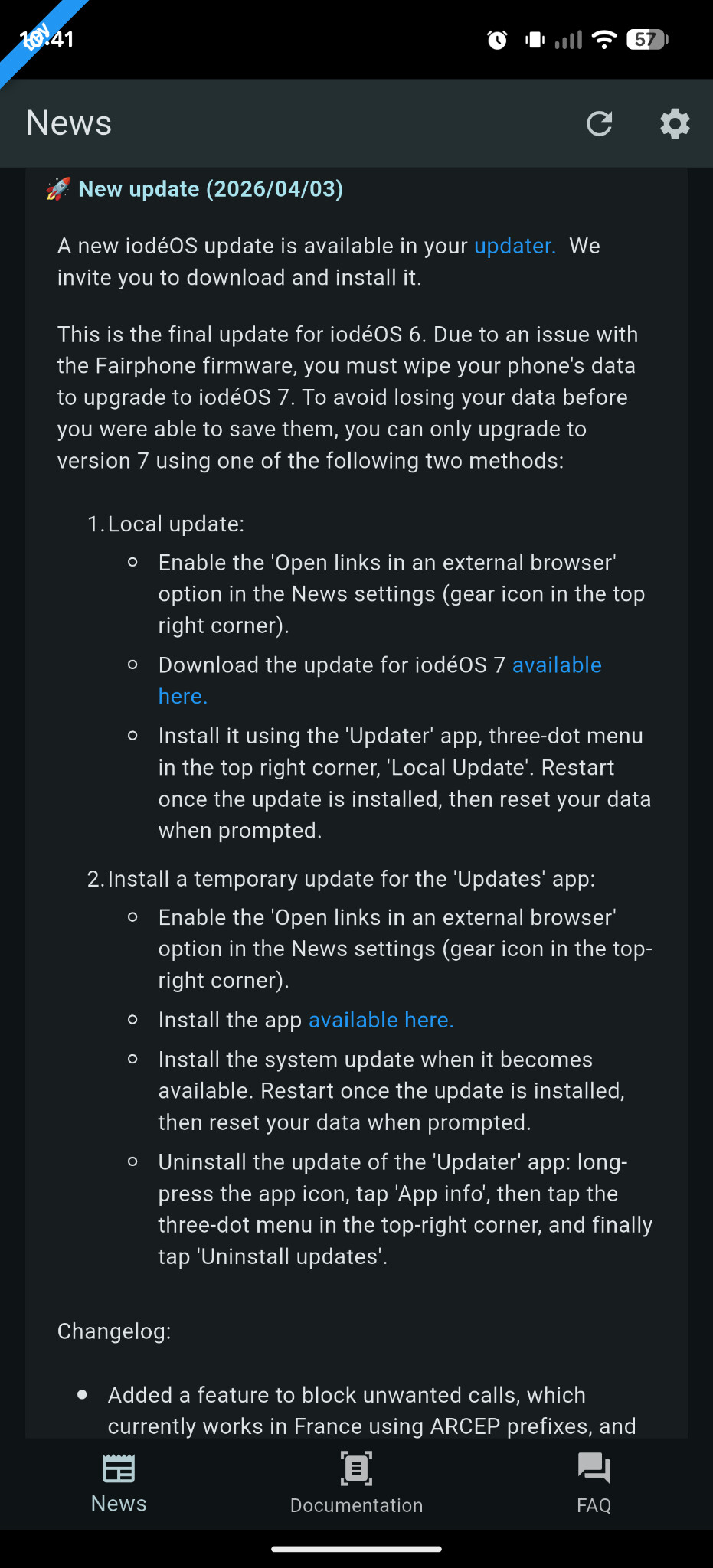
FP4 users, please check your iodé news app for the complete guide on what to expect from the move from iodéOS 6 (android 15) iodéOS 7 (Android 16). The information in this screenshot might be entirely correct and up-to.date. Your news app will show the correct information.
1 Like
This news is intented for users who had a locked bootloader, those who don’t shouldn´t have any issues with the upgrade… but I’ve asked members of the team with a FP4 to clarify.
Same here, the battery drain is huge on 6.x
If I do understand well on 7.x iodé the battery drain is fixed?
If yes, I’m up to wipe all my data to do the upgrade since how annoying the battery drain is.
If someone did this I’m really curious to know