Android Auto issues with voice commands

@rik just in no particular order - here are some findings I did on my car this morning (as I had some time to play around for a little bit):

Devices
This is what I used for testing:

  • 2018 model Mazda 6 (‘Atenza’ if outside ANZ).
  1. iPhone 12 Pro Max (my daily phone for 4½+ years until 2-3 weeks ago - no SIM, but connected to Wi-Fi),
  2. Samsung Galaxy A34 5G stock android (so a 2023 model - unit is a company phone from recent employee who left so was in daily use up until a few weeks ago - tested with no SIM & no Wi-Fi),
  3. BraX3 Privacy Phone (2 SIMs & Wi-Fi connected).
  • Standard official Apple USB-A to Lightning Cable as supplied with previous Apple devices (from one of my prior iPhone’s, have used same cable in car for 5 years - in as new condition),
  • BraX USB-A to USB-C cable supplied with the phone (essentially new - this is what I have been using to connect BraX3 to car),
  • Momax (supposedly) High Quality USB-A to USB-C cable (this is what I regularly use to connect devices to my PC, including the BraX3. Not sure of official spec but think it’s USB 3.1 otherwise 3.0 - gets limited to use so in as new condition).

Bluetooth
My Mazda happily connects with my iPhone 12 Pro Max via USB for Car Play, with the Bluetooth disabled in the car unit. You have full functionality of everything and it all works. I connected via the usual cable I have used for the last 5+ years.

However the car will not allow an Android Auto connection to USB without Bluetooth enabled and the phone paired to Bluetooth, along with the USB connection. It does this for any connection regardless of the device. So I can only assume this is standard behaviour - at least for an Android Auto unit from around 2019-2000 (as mine was installed retrospectively in early-2000 as previously noted).

Functionality
As an aside I noted Organic Maps does not work with Siri on iPhone, so no voice input in Car Play - I had forgotten about this. Restricted to only keyboard whether on phone or on vehicle’s AA display. Just a note to highlight some apps may not support CP and/or AA regardless, even if you have fully functional digital assistant. In this case it might be an Apple specific thing due to FOSS origin of app I guess?

On the Samsung Galaxy A34 phone I found it reported errors with some functions - particularly when trying to get things ‘read out’ by the digital assistant. My best guess is it is because of no internet connection, so it can’t phone home to G so has no way to do anything? Maybe? As soon as I can I will connect it to wi-fi and quickly retest. You could browse message histories, and other things you can’t on BraX3 with iodé. But basically as it stands it was a bit flaky; and generally I found the stock implementation pretty poor compared to how Car Play performs both in appearance and it’s UI functionality even allowing for the errors - it’s the first time I’ve used stock AA (and again, as I previously mentioned, it doesn’t support half the Car’s basic Nav control functions that CP does - like the back/return button). Note also cable comments below for this phone.

BraX3 continued to show all the usual functionality issues I have previously raised - and this didn’t change regardless of which USB-A to USB-C cable I used (details above). AA repeatably locks up and comes unresponsive - often as soon as you start media playing, or if you manage to manually initiate a phone call from your contacts. Won’t show any SMS or similar (e.g. Molly for Signal) message history (so screen blank) and won’t initiate a new message when you click on that function’s icon…

Cables
So no problem with iPhone and the USB-A to Lightning Cable, as expected - as I have used this for several years.

Also no problem connectivity wise with BraX3 - it worked fine with both USB-A to USB-C cables (the BraX one and the Momax one).

However oddly enough the Galaxy A34 5G would only connect on the BraX cable, not the Momax one. I removed the case to ensure it was inserting fully, and it was - the phone registered the USB connection, played it’s connection sound and started charging. But the car steadfastly refused to recognise any device connection to initiate AA. It connects fine on the BraX cable.

This phone has USB 2.0 support for it’s USB-C port - so maybe that’s the reason the Momax cable didn’t work. It exhibits the same behaviour on my PC too; Happily connects via a low quality USB-A to USB-C cable but doesn’t via the Momax one. So having an ‘over-spec’ cable or similar is something to watch out for (although it could of course be something with the Momax cable itself - but it works with every other device I use it with).

The BraX3 is USB 2.0 also as you know.

As a final aside, given the age of the vehicle the USB input is probably only USB 2.0 too, or maybe 2.1 (can’t imagine it’s 3.x) - but I’d need to figure out how to check if needed. So given most phones are still handicapped by a USB 2.0 input this might explain why AA forces a Bluetooth connection and Apple Car Play doesn’t; because Apple does a much better job of managing the connectivity speed & bandwidth needs, whereas Android needs the BT connection to help spread load due to different approach to how the 2 units communicate?

Anyway will do a quick retest of A34 with internet access via wi-fi and see if that changes functionality…

@rik a further update. Bear in mind with what I say here this is just what I found and I may have missed something (possibly bleedin’ obvious) that changes things - but anyway… Connected A34 to wi-fi and tested - partial functionality (e.g. it would read out the weather). So definitely needed internet to for digital assistant to work at all, HOWEVER…

…it still wouldn’t work for reading out SMS messages, nor could I get any STT working. In fact for the former (just to read out text messages) it said you needed to go into Digital Assistant Settings and allow personal items, but when I tried to do that on the phone (in settings) it said no connection available - despite having an active connection to the internet. It was clearly trying to launch something (plain grey/silver page - my suspicion is a webpage with the frame/border disabled) - presumably from Google server. So…

My conclusion is it’s trying to access something in your Google Account online where the Digital Assistant Settings and Permissions, and possible dictionary and similar, are stored. Forcing you to have an active signed in connection to use it. Or at least to set it up. BUT that still leaves me stumped over people who say they have used the Google Apps, but not signed in and locked them down with no internet access - including maps - so I can only assume they are not using any TTS (except perhaps for map directions) and especially no STT at all?

So at this stage my summary is (and probably needs more testing by someone else with a more technical knowledge of Android than I do to confirm these assumptions) that for Google Digital Assistant (i.e. Google Speech Recognition & Synthesis app) to work it needs:

  1. An active internet connection (it may do some things offline, but initial set up and some functions, like some TTS and especially all STT, will always need it, it seems) - this is probably due to both the device alone won’t have the processor grunt to do all the speech processing work, but also #2 below,

  2. It would seem it needs you to be actively logged into a Google Account on the device (or something akin to this) - otherwise it can’t access key things like your personal settings and permissions, and language dictionaries and whatever… While some of this may be for valid technical reasons it’s likely also a hook to ensure you can never use it offline, and without being connected to G, for tracking purposes. I can’t see any other reason for the result I repeatedly saw this afternoon with it trying to open a page and saying no connection available.

  3. It needs some unique features that some apps (FOSS, etc) will probably never have so won’t work with it regardless. Likely because they don’t have the necessary included functionality; and/or lack some sort of proprietary code or connectivity built in - similar to how Organic Maps in iOS has no option for STT input. Most map apps have some TTS support it seems, even if via third party TTS, but that’s all you will get (I’d suspect like iOS in Android G DA just won’t work regardless as TTS with open source maps apps).

:thinking: :face_with_raised_eyebrow:
So, in conclusion, basically you won’t get STT functionality, so no voice search functions in maps, phone contacts and similar, no sending SMS messages by voice (or reading them), etc. I think in all reality it may require someone backwards engineering the whole thing and how it works, and fully developing something to talk to the AA units in vehicles - and that may be a challenge if there is some proprietary stuff in there (let alone the time and effort involved).

:face_with_diagonal_mouth:
My last thing will be to remove the voice stub(s) and try Google Speech Recognition & Synthesis - mostly to see if I can get FOSS maps working better, and possibly installing base Google App (I believe it’s got G Search built in as part of the functionality for AA) makes basic phone calls work and other apps work and the apps and screen navigation more stable - if not then it’s likely FOSS type apps just aren’t going to work with it full stop.

:man_shrugging:
TBH I’m not confident so am already working on a back-up concept/work around that, if it’s not a dramatic success, I’ll have to resort to. Basically falling back to the car’s built in calls, messages, and maybe media functions despite poorer security and functionality - and with no TTS or STT. But at least I will be able to read SMS and send simple 1 word replies; answer and make calls reliably, etc, etc. And AA on the phone will only be used when needed for maps with active traffic info (e.g. OsmAnd) and perhaps playing podcasts (although as you download these to device I may just find it as easy to play them like standard music media instead)…

=============================================
EDIT: Adding this here as I am currently at my 3 consecutive posts limit on this thread.

@rik just a further quick update - continue to have ongoing problems with AA with just basic stuff (playing music or podcasts). Intermittently get errors on connection, probably about a third of the time and sometimes requires 3 or more connection attempts (with USB cable) for AA to start correctly - some of the failed attempts result in a red AA Connection Failure warning screen on the phone. When it does connect about another third of the times it starts playing media for a couple of seconds then freezes and locks up, again resulting in a failure and need to disconnect then reconnect. This is without even doing anything special (like phone calls or text messages in or out), or using maps - just basic navigation or playing maps.

So overall I am finding 50% of times you connect it fails, completely, because of one error or another - so it’s highly unstable running on only the stubs and FOSS type apps. At least in my vehicle and phone combination.

Musing here, but what could be good and useful would be someone who has more knowledge of the CP/AA Hardware side - i.e. the modules that go in the vehicles (and ideally any software stuff relating to them)? Have they changed over the years (e.g. my unit installed in very early 2020 is it the same as the units installed in current vehicle models in 2023-2025? If not what is different?); is there something specific it looks for on the attached device, and if you don’t have it it will never work - so nothing other than an Apple iPhone or a stock google Android phone will work or have full functionality with the unit? Is that why people who have converted Pixel’s and such into degoogled phones get reasonable functionality (sans any digital assistant) as even though the OS isn’t stock the phone is and has something in the hardware AA ‘sees’ and they are using the stock Google apps (albeit locked down) on stock hardware with just the OS changed? Just some thoughts…

(P.S. It is Saturday Afternoon here so I am about to try adding in G Voice App to see what that does, and possibly the main G App after - so will report back on that).

Didn’t get time to fully go through your post above, just replying here so that you can now post up to 3 more messages :slight_smile:

1 Like

Thanks @rik - its been a long week, seems like an aeon ago I did my latest Android Auto tests! Anyway, unfortunately as I couldn’t post here on the day (due to the 3 post limit) I didn’t get around to writing down in detail what I did and observed ‘on the day’, but anyway here’s a summary of what I spent a couple of hours or so doing today a week ago as I recall them:

(1) Google Speech Recognition & Synthesis
I added this in, removing the stub first. It had no meaningful impact on how Android Auto performed, and I couldn’t’ get it to initiate for anything. In cases where there was normally the microphone button to initiate STT input you couldn’t get to the microphone option (due to the other system navigation issues) nor did it trigger properly. So overall effect was no change.
:slightly_frowning_face:

Note at this time I had SherpaTTS and FUTO Voice (STT) both installed - these were installed on the phone and I kept them installed the whole time I did these tests to see if I could get them to work once I had the Google stuff working…

P.S. I had checked everywhere I could find by searching settings to make sure Google Speech Synthesis was set as the default app for any TTS and STT.

(2) Google Voice Access
Next thing was I added this - keeping above installed. Thought it might help with STT but no… basically there was no apparent benefit having this.

(3) Google (Search) App and Google Maps
Next step I removed the remaining 2 stubs and installed these 2 apps. It was interesting to note this did slightly improve system navigation in the car - the system froze less often and some functions were accessible that previously weren’t. Also SMS messages now showed in the SMS app/utility screen - although you still couldn’t read them (i.e. clicking on them did nothing) or use TTS to reply (for same reason); nor did create/initiate a new message work (as previous clicking on it caused it to briefly change colour showing it triggered the action state or whatever, so presumably tried to initiate something - but nothing happened).

Also when a new SMS arrived it’s notification appeared on screen like before in a pop up, and you could click it to play aloud (unlike previous which did nothing), but it would just then say an error occurred (so I’d speculate tried to call the digital assistant or the voice synthesis to process the contents of the message and failed). It would then lock up after that - so basically it sort of could go one step further than it did previously but still ended up not playing the message and locking up the AA screen; so you had to disconnect and reconnect to restart…

Everything above was still installed too, so: Google Speech Recognition & Synthesis, Google Voice Access, SherpaTTS and FUTO Voice (STT).

(4) Google Assistant
As a last resort I installed this - it’s a concern if you need it long-term because looks like it’s being superseded with full on Gemini shortly - so essentially enforced full AI use. However oddly either this current version of the app (or perhaps it was the Google (Search) App above - can’t recall which it was) required zero permissions or external access - meaning it might be (or would have been) fairly safe to use with iodé locking it down further as extra security?

Firstly it did not show up as a digital assistant (in the manage digital assistant option in settings for AA). Nor could I get anything to show there the whole time. So that was also weird and suggested something was fundamentally broken or not right in how that integrated with the FOSS Android (iodéOS) versus stock Google Android? But maybe I just missed something with permissions and such…?
:man_shrugging:

Anyway all of that didn’t matter in the end, because it made zero difference again. No further improvement, a portion of functions or menu options unusable in the AA car, it still randomly froze when doing things or you. And couldn’t get any STT input to work with things like OsmAnd (or even Google Maps).

So by this stage I had Google (Search) App, Google Maps, Google Speech Recognition & Synthesis, Google Voice Access, Google Assistant, SherpaTTS and FUTO Voice (STT) all installed. And it still wouldn’t work.

The only things I didn’t do - as I forgot/didn’t think of it at the time - was to (a) fully uninstall SherpaTTS and FUTO Voice (STT) just in case there was some weird conflict - but I think this is unlikely, and (b) fully test every test I tried in the car also just on the phone (without the car and AA) - I did a couple but not everything.

So I can’t verify for certain if everything that failed in AA also would have failed on the phone regardless - some definitely did. If I had we might have been able to conclude the issue was with use of these services generally on the phone and OS, and not so much AA specifically… But I’d suspect this is the case to a degree; that it’s both that some of these don’t quite integrate with the OS the same way they do on Google stock Android (maybe missing some proprietary hook), but also that there’s also a problem with AA and that’s something that’s a significant difference from stock Android (my earlier musing about some sort of proprietary connectivity required in AA lacking from FOSS android systems).

So that was about it. There were some more minor things I tried to dig into (e.g. media control, etc) but basically I could not get Phone, SMS/Messages, any Maps, or other media or apps (e.g. Molly) to work consistently and with full functionality, or ins some cases at all, regardless of how much Google stuff I installed…
:thinking: :face_with_raised_eyebrow: :pensive_face:

Wondering if iodé app (blocker) was possibly at play too: possibly going full “no privacy here” mode (just fully disable iodé blocker) for testing would get things working then we pare back from there.

I still didn’t get access to an AA enabled car to review the state of things to catch up to your testing…

1 Like

Sorry - forgot to mention I did that too. Had tried as final step zero restrictions on all the G apps above incl. AA - do 6 apps with unrestricted access (and permissions) in my main profile…

So either I’m missing something or its never going to work on this hardware or OS?

But I have now also puchased a GP8P as a second device, so once I have that I can repeat tests with origjnal G hardware running iodé; and see if any difference…

1 Like

@rik a further update - I have since purchased a mint Google Pixel 8 Pro as a second device to try iodéOS on (that is a stock mainstream model); and that can later be my temporary daily driver so as to allow me to then use my BraX3 for potentially being a beta tester of UBT. I also thought I could revisit AA with iodé on that device. Anyway…

I am about to do the iodéOS install on it, and before I did I hooked it up to my car (Mazda) to double check the stock default (‘factory reset’) Google Android connectivity and performance:

  1. I had fired up the phone on receipt and completed final set up doing the barest minimum of things (so hadn’t logged into a Google Account or the Google Play Services, and hadn’t set up digital assistant, etc). I pre-connected Bluetooth to my car to ensure no issues caused by that idiosyncrasy of needing Bluetooth and USB that AA seems to have (at least the unit in my car does).

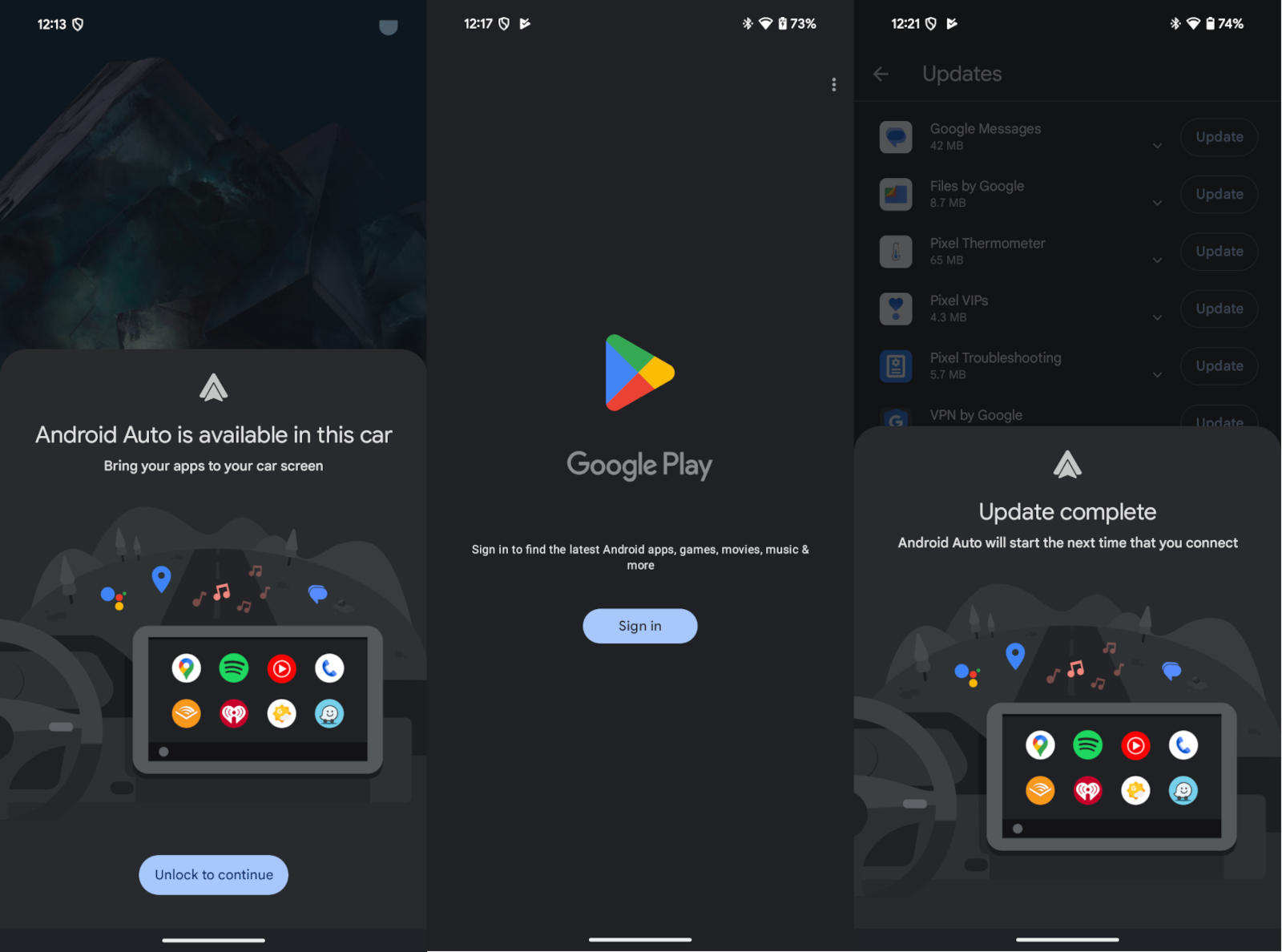
  2. When I connected to my car the phone immediately identified there was a valid AA system present and available to connect to - it them pushed me immediately to a Google Play Services log in screen, and required me to log in to go any further. I could not proceed any further with enabling AA without logging into an account at this point.

  3. I had not connected Wi-Fi up to this point so I did do that and tried again. When it pushed me to the Google Play Services log in screen, and required me to log in to go any further, I found going back to prior screen just enabled the AA Update anyway, without a log in. I also could separately go into the Google Play Store > Updates (without logging in) and enable updates for any pre-installed or system features. So I could update voice recognition, Google (search) app, etc, as well as AA to latest version. Once AA had updated this got me to the final screen shot below:

  1. I then got Android Auto connected and working. And everything worked as expected that I could see, including voice. But again, as I found with the Samsung A34 to do anything with voice I needed to log into a Google Account and enable personal recommendations and other settings… So it would not function without a Google Account log in.

So I can only come to the conclusion that my earlier gut feel that something proprietary is at play - whether it’s in the app software & hardware combination, or more likely it’s in the G account log in part and stuff on the servers. So without being logged into G Account and having access to G servers it just isn’t going to work for voice functions and probably some other basic app functions.

So I am pretty sceptical now it can made to work as is with degoogled hardware. Given the stock Android has behaved the same way for me for 2 different common mainstream devices… As we previously discussed a few isolated functions may work to some degree, but the full integrated functionality will need something more I suspect (maybe a reverse engineered connectivity app for the device)?

I don’t think testing with iodé on this device (GP8P) will provide anything new or useful; but I will give it one more go regardless, once I have done the initial install & build of iodé later today - so I will update you here next couple of days once that’s done…

P.S. GP8P was showing Android 16.

Have you tested those ‘other basic app functions’. Why do you assume that they won’t work just because voice functions don’t work?

Because I’ve tested them and they don’t work.

OK, so which functions have you tested that don’t work?

See these posts - you’ll have likely already see some of them - I have removed superfluous comments from the quotes. Also I haven’t compiled a detailed chart of the issues, but if you go through those posts you’ll see I’ve covered a pretty comprehensive spread of all the standard things you’d want to use and functions you’d want available. But as I have said previously I’m not an expert with Android, so there might be some settings or such I am missing at a deep level in the OS - but I do think that’s unlikely.

25 September 2025 (from BraxTech Forum)

2 October 2025

3 October 2025

4 October 2025 (from BraxTech Forum)

4 October 2025

7 October 2025

9 October 2025

9 October 2025

[quote=“mycenius, post:22, topic:6860, full:true”]

@rik a further update. Bear in mind with what I say here this is just what I found and I may have missed something that changes things - but anyway… Connected A34 to wi-fi and tested - partial functionality (e.g. it would read out the weather). So definitely needed internet to for digital assistant to work at all, HOWEVER…

…it still wouldn’t work for reading out SMS messages, nor could I get any STT working. In fact for the former (just to read out text messages) it said you needed to go into Digital Assistant Settings and allow personal items, but when I tried to do that on the phone (in settings) it said no connection available - despite having an active connection to the internet. It was clearly trying to launch something (plain grey/silver page - my suspicion is a webpage with the frame/border disabled) - presumably from Google server. So…

My conclusion is it’s trying to access something in your Google Account online where the Digital Assistant Settings and Permissions, and possible dictionary and similar, are stored. Forcing you to have an active signed in connection to use it. Or at least to set it up. BUT that still leaves me stumped over people who say they have used the Google Apps, but not signed in and locked them down with no internet access - including [Google] maps - so I can only assume they are not using any TTS (except perhaps for map directions) and especially no STT at all?

So at this stage my summary is (and probably needs more testing by someone else with a more technical knowledge of Android than I do to confirm these assumptions) that for Google Digital Assistant (incl. Google Speech Recognition & Synthesis app) to work it needs:

  1. An active internet connection (it may do some things offline, but initial set up and some functions, like some TTS and especially all STT, will always need it, it seems) - this is probably due to both the device alone won’t have the processor grunt to do all the speech processing work, but also #2 below,
  2. It would seem it needs you to be actively logged into a Google Account on the device (or something akin to this) - otherwise it can’t access key things like your personal settings and permissions, and language dictionaries and whatever… While some of this may be for valid technical reasons it’s likely also a hook to ensure you can never use it offline, and without being connected to G, for tracking purposes. I can’t see any other reason for the result I repeatedly saw this afternoon with it trying to open a page and saying no connection available.
  3. It needs some unique features that some apps (FOSS, etc) will probably never have so won’t work with it regardless. Likely because they don’t have the necessary included functionality; and/or lack some sort of proprietary code or connectivity built in - similar to how Organic Maps in iOS has no option for STT input. Most map apps have some TTS support it seems, even if via third party TTS, but that’s all you will get (I’d suspect like iOS in Android G DA just won’t work regardless as TTS with open source maps apps).

:thinking: :face_with_raised_eyebrow:
So, in conclusion, basically you won’t get STT functionality, so no voice search functions in maps, phone contacts and similar, no sending SMS messages by voice (or reading them), etc. I think in all reality it may require someone backwards engineering the whole thing and how it works, and fully developing something to talk to the AA units in vehicles - and that may be a challenge if there is some proprietary stuff in there (let alone the time and effort involved).

:face_with_diagonal_mouth:
My last thing will be to remove the voice stub(s) and try Google Speech Recognition & Synthesis - mostly to see if I can get FOSS maps working better, and possibly installing base Google App (I believe it’s got G Search built in as part of the functionality for AA) makes basic phone calls work and other apps work and the apps and screen navigation more stable - if not then it’s likely FOSS type apps just aren’t going to work with it full stop.
:man_shrugging:

=============================================
EDIT: Adding this here as I am currently at my 3 consecutive posts limit on this thread.

@rik just a further quick update - continue to have ongoing problems with AA with just basic stuff (playing music or podcasts). Intermittently get errors on connection, probably about a third of the time and sometimes requires 3 or more connection attempts (with USB cable) for AA to start correctly - some of the failed attempts result in a red AA Connection Failure warning screen on the phone. When it does connect about another third of the times it starts playing media for a couple of seconds then freezes and locks up, again resulting in a failure and need to disconnect then reconnect. This is without even doing anything special (like phone calls or text messages in or out), or using maps - just basic navigation or playing maps.

So overall I am finding 50% of times you connect it fails, completely, because of one error or another - so it’s highly unstable running on only the stubs and FOSS type apps. At least in my vehicle and phone combination.

18 October 2025

21 October 2025

25 October 2025

…at least without a Google Account active on the device - the odd app may work in it’s basic form, like maps and media players, but not everything nor full functions.

Further to this see below post on the BraxTech forum (and my response quoted below). This is the bit that’s frustrating me - and it seems so inconsistent - the poster Haley had similar issue to me and couldn’t get anything to work in their vehicle, and then in a different vehicle everything works when nothing else changed supposedly - and I assume they were not logged into any Google Accounts or had the Google Digital Assistant active…?? I’ve asked for further details to double check apples for apples discussion….

P.S. I’ve done some quick testing on my GP8P running iodéOS and initial impression is same result as BraX3 - but I need to do a more systematic longer test with it, to try every permutation and app I tried on the B3, to verify nothing works consistently without the G apps installed, etc, as the B3 displayed…

The posts are in this thread here:

2 Likes

Sadly, I think this shows that there are issues in the car manufacturer’s implementation of AA. Also, sadly car manufacturers have a terrible reputation for providing software fixes. We will probably need to start a manufacturer table to map various AA features / issues (but there are also a lot of moving parts so it may well be outdated quickly: if we include car firmware version, iodé version, etc. it may help).

2 Likes

Yes maybe @rik - and certainly looks like older models of vehicles are more prone to issues. I’m taking a break from AA for a bit - I have a workaround using my Mazda’s built in system which although not ideal at least gives me minimum I need for now. I’ll come back to revisiting AA in a wee while but tag me in a post if you want me to check something specific for you, etc…

Also I assume you saw Haley’s response to me on the BraxTech forum - I’ll reproduce below here for completeness - but basically confirmed my suspicions - his worked on a new model vehicle but likely only because he was logged into Google on his degoogled privacy phone (to access his games - see point 1 below)…

2 Likes

Just an FYI if you haven’t seen it - see this post in BraxTech Community: